10 Talking to devices: the serial port and the VGA text console
At the end of chapter 9 the kernel runs in protected mode with a GDT of its own, and it proves it by writing the string “Protected mode OK” straight into the VGA frame buffer, one 16-bit cell at a time. That was enough to see that we got there. It is not enough to write a kernel with: a function that writes one line at the top-left corner cannot print a second line, cannot print a number, and cannot be read by anything other than a human looking at the QEMU window.
In this chapter we give the kernel a voice. We write a driver for the
serial port, a driver for the VGA text screen, a kprintf
that formats numbers and strings on both, and a panic() for
the moments when the kernel must stop. Along the way we meet the two
ways an x86 CPU talks to a device, port-mapped and memory-mapped I/O,
and the gcc inline assembly that lets C code use the in and
out instructions. Once the kernel can print, we use the
same inline assembly for a second instruction, cpuid, and
let the kernel say which processor it runs on. Chapter 11, Interrupts,
needs every piece of this: when a CPU exception happens, the first thing
a kernel does is print what went wrong.
Running this chapter’s code
The code is in code/chapter10/os. Start the toolchain
container from the root of the repository, as chapter 0 explains, with
that directory as the working directory:
$ docker run --rm -it --user "$(id -u):$(id -g)" --security-opt seccomp=unconfined \
      -v "$PWD":/work -w /work/code/chapter10/os os01
Inside it, make builds build/disk.img.
make qemu boots the image with the CPU stopped at its first
instruction, a gdb stub on port 26000 and the serial port on the
terminal; make gdb in a second shell
(docker exec -it <container> sh, or a second
docker run into the same directory) connects, loads the
symbols and stops at kmain. make test boots
headless and succeeds when the string
Hello World from the kernel! appears on the serial port;
the whole serial log is printed either way, so a failing test still
shows what the kernel said. make clean removes
build/.
10.1 Why output comes first
You cannot debug what you cannot see. So far we have had one window into the machine, gdb, and it is an excellent one: we can stop the CPU at any instruction and inspect every register. But gdb shows the state of the machine at one point in time, chosen by us, and it only works while we sit in front of it. A kernel also needs to tell its own story: “I reached this point, with these values”, written as the code runs, by the code itself. Every kernel developer uses both windows, and the second one is the one that is read the most.
Where should that story go? The screen is the obvious answer, and we will use it, but it has three defects. It is small: 25 lines, and the oldest ones scroll away. It is volatile: when the machine reboots because of a bug (chapter 11 will show how easily that happens), everything on the screen is lost at the exact moment we need it. And it is only readable by a person looking at it: no program can check it.
The serial port has none of these defects. It is a byte stream that
leaves the machine: on a real computer it goes down a cable to another
computer running a terminal program; in QEMU it goes wherever we ask, to
the terminal we started QEMU from or to a file. It is also the simplest
device on the PC: a handful of registers, polled in a loop, with no
interrupt or memory setup required. That is why it is the universal
debugging channel of kernel developers. Linux prints its boot messages
on it when booted with console=ttyS0,115200, and the first
printing function of a fresh port of Linux to a new machine is always
“write a byte to the UART”.
For this book there is one more reason, which decides the design of
the whole of Part III: a byte stream can be checked by a machine. From
this chapter on, make test boots the kernel in QEMU with
the serial port captured to a file and looks for the text the kernel is
expected to print, and the continuous integration of the repository does
the same for every chapter on every commit. That is only possible
because the kernel prints to the serial port first and to the screen
second.
10.2 How a CPU talks to a device
Chapter 3 described the machine as CPU, memory and devices connected by buses. From the point of view of a program, a device is a set of registers: writing to one of them tells the device to do something, reading from one tells the program what state the device is in. The question is how the CPU addresses those registers, and x86 gives two answers.
10.2.1 Port-mapped I/O
The x86 has a second address space, separate from memory, called the
I/O address space. It is 64 KiB large, addressed by a 16-bit
port number, and it can only be accessed with two instructions,
in and out, and their string variants. Nothing
in memory corresponds to a port: mov cannot reach it, and a
pointer cannot point to it. Read Intel SDM Volume 1, chapter 20,
“Input/Output”, sections 20.1 to 20.3: “I/O Port Addressing”, “I/O Port
Hardware” and “I/O Address Space”. They are short and they settle a
question that confuses many beginners: the I/O space is a property of
the processor, not of the operating system, and a port number means the
same thing in real mode and in protected mode.
The instructions themselves are described in Volume 2 under “IN—Input
from Port” and “OUT—Output to Port”. The thing to notice there is the
operand forms. The data always travels through the accumulator:
AL for a byte, AX for a word, EAX
for a double word. The port number is either an 8-bit immediate, which
only reaches ports 0 to 255, or the DX register, which
reaches all 65536. Those are the only two forms. The serial port lives
at port 0x3F8, so it can only be reached through
DX.
The same chapter of Volume 1 has a section called “Protected-Mode
I/O”. It explains that in protected mode the in and
out instructions are privileged: they are allowed only if
the current privilege level is at most the I/O privilege level
field in EFLAGS, or if a per-task bitmap in the TSS allows
the specific port. Our kernel runs in ring 0, where everything is
allowed. The bitmap comes back in chapter 13, when user programs must be
stopped from talking to the hardware.
10.2.2 Memory-mapped I/O
The other way to reach a device is to put its registers, or its
buffer, at memory addresses. The CPU executes an ordinary
mov to that address; the chipset, which decodes addresses
on the bus, routes the access to the device instead of to RAM. Nothing
distinguishes such an access in the program; what distinguishes it is
the address.
The VGA text buffer at physical address 0xB8000 is the
example we have used since chapter 9. The 4000 bytes starting there are
not RAM: they are the video adapter’s memory, exposed in the address
space of the CPU so that writing a byte there changes a character on the
screen. Why that particular address, below 1 MiB? Because the original
IBM PC placed the video memory there, and every PC since has kept the
region from 0xA0000 to 0xBFFFF reserved for it
so that old software keeps working. Chapter 12 shows the memory map the
BIOS gives us, in which that region is a hole, not RAM at all, and how a
kernel keeps such regions reachable once paging is turned on.
Memory-mapped device registers have one consequence for C
programmers: the compiler must not optimize the accesses. To a compiler,
two consecutive stores to the same address, with no load in between, are
one store too many; a load whose result is not used is dead code; a
store in a loop that writes the same value every time can be moved out
of the loop. All of those transformations are wrong for a device
register, where every single access has an effect the compiler cannot
see. The C keyword volatile tells the compiler that an
object may change, or have side effects, outside the program, so every
access written in the source must happen, in the order written. This is
why the frame buffer is declared as volatile uint16_t * in
vga.c, and why volatile appears on every
inline assembly statement in io.h. At -O0, the
optimization level we compile with, the compiler would not optimize
anything anyway; but a driver that only works at -O0 is not
a driver, it is a bug waiting for a flag change.
10.3 Inline assembly:
io.h
C has no notion of an I/O address space, so the in and
out instructions must be written in assembly. We could put
them in entry.asm and call them as functions, but a
function call for every byte sent to a port is heavy, and more
importantly it hides from the compiler what the code does. gcc’s
inline assembly lets us put an instruction in the middle of a C
function and tell the compiler which C variables go into which
registers. Here is the whole of the header:
io.h
#ifndef IO_H
#define IO_H

#include <stdint.h>

/* Port I/O.  x86 devices are reached either through memory-mapped registers
   or through a separate 64 KiB "I/O address space" that only the IN and OUT
   instructions can touch (Intel SDM Vol. 1, chapter 20 "Input/Output").
   These wrappers exist so that C code can use that space.

   GCC inline assembly: "a" means the operand lives in AL/AX/EAX, "Nd" means
   an 8-bit constant or the DX register, which are the only two forms IN/OUT
   accept for the port number.  "volatile" stops the compiler from removing
   or reordering the access: the hardware has side effects it cannot see. */

static inline void outb(uint16_t port, uint8_t value)
{
    asm volatile("outb %0, %1" : : "a"(value), "Nd"(port));
}

static inline uint8_t inb(uint16_t port)
{
    uint8_t value;
    asm volatile("inb %1, %0" : "=a"(value) : "Nd"(port));
    return value;
}

static inline void outw(uint16_t port, uint16_t value)
{
    asm volatile("outw %0, %1" : : "a"(value), "Nd"(port));
}

static inline uint16_t inw(uint16_t port)
{
    uint16_t value;
    asm volatile("inw %1, %0" : "=a"(value) : "Nd"(port));
    return value;
}

/* Old devices (the 8259A PIC, the 8253 timer) need a short pause between
   two accesses.  Writing to port 0x80, the POST diagnostic port, is the
   traditional way to waste about a microsecond (OSDev wiki: "Inline
   Assembly/Examples", io_wait). */
static inline void io_wait(void)
{
    outb(0x80, 0);
}

#endif
The syntax is documented in the GCC manual, chapter “Extensions to
the C Language Family”, section “How to Use Inline Assembly Language in
C Code”, subsection “Extended Asm - Assembler Instructions with C
Expression Operands”. Read that subsection with outb in
front of you; it is long, but the part we use is small. An extended
asm statement has four parts separated by colons:
asm volatile( template : outputs : inputs : clobbers );The template is the instruction, in AT&T syntax, the syntax of the GNU assembler that gcc feeds its output to: the source operand comes first and the destination second, the opposite of the Intel syntax used by
nasmand byobjdump -M intelthroughout this book.%0,%1and so on are placeholders for the operands, numbered in the order they appear in the output and input lists.The outputs are C expressions that receive a value from the assembly.
outbhas none, hence the empty field between the first two colons.inbhas one,"=a"(value): the=means the operand is written, andasays where.The inputs are C expressions whose values the assembly needs.
"a"(value)and"Nd"(port)inoutb.The clobbers list registers and memory the instruction modifies behind the compiler’s back.
inandoutmodify nothing but their operand, so the list is empty and the last colon is omitted.
The letters in quotes are constraints: they tell the compiler where an operand must be placed before the instruction runs. The general ones are listed in the manual’s section “Simple Constraints” and the processor-specific ones in “Machine Constraints”; look at the x86 family in the latter. Three letters do all the work here:
ais “thearegister”, that isAL,AXorEAXdepending on the size of the C expression.uint8_t valuegoes toAL. This is exactly the formoutrequires for its data operand.dis “thedregister”,DXfor a 16-bit port number.Nis “unsigned 8-bit integer constant (forinandoutinstructions)”. It is only satisfied when the port number is a compile-time constant below 256.
Writing two letters together, "Nd", gives the compiler
two alternatives: use the immediate form if the port is a small
constant, otherwise put it in DX. The instruction mnemonic
in the template is the same in both cases, outb, and the
assembler picks the encoding from the operands it sees. Since
0x3F8 does not fit in 8 bits, every access to the serial
port takes the DX form, and so does every access to the VGA
controller at 0x3D4; io_wait, with its port
0x80, is the one place where the N alternative
could apply.
The word volatile after asm has the meaning
discussed above: the compiler must not delete the statement because its
outputs are unused (there are none in outb), must not move
it out of a loop, and must not merge two identical statements into one.
The polling loop in serial_putc below reads the same port
again and again, and each read must really happen.
What does all this compile to? Let us look at the object file. The
functions are static inline, but at -O0 gcc
does not inline anything, so each one is emitted as an ordinary local
function in every file that uses it:
$ objdump -d -M intel build/os/serial.o

00000000 <outb>:
   0:   55                      push   ebp
   1:   89 e5                   mov    ebp,esp
   3:   83 ec 08                sub    esp,0x8
   6:   8b 55 08                mov    edx,DWORD PTR [ebp+0x8]
   9:   8b 45 0c                mov    eax,DWORD PTR [ebp+0xc]
   c:   66 89 55 fc             mov    WORD PTR [ebp-0x4],dx
  10:   88 45 f8                mov    BYTE PTR [ebp-0x8],al
  13:   0f b6 45 f8             movzx  eax,BYTE PTR [ebp-0x8]
  17:   0f b7 55 fc             movzx  edx,WORD PTR [ebp-0x4]
  1b:   ee                      out    dx,al
  1c:   90                      nop
  1d:   c9                      leave
  1e:   c3                      ret
0000001f <inb>:
  1f:   55                      push   ebp
  20:   89 e5                   mov    ebp,esp
  22:   83 ec 14                sub    esp,0x14
  25:   8b 45 08                mov    eax,DWORD PTR [ebp+0x8]
  28:   66 89 45 ec             mov    WORD PTR [ebp-0x14],ax
  2c:   0f b7 45 ec             movzx  eax,WORD PTR [ebp-0x14]
  30:   89 c2                   mov    edx,eax
  32:   ec                      in     al,dx
  33:   88 45 ff                mov    BYTE PTR [ebp-0x1],al
  36:   0f b6 45 ff             movzx  eax,BYTE PTR [ebp-0x1]
  3a:   c9                      leave
  3b:   c3                      ret
....remaining output omitted....
There is the out dx,al at offset 1b, a
single byte ee, and the in al,dx at offset
32, the byte ec. Everything around them is the
-O0 prologue, the copying of arguments from the stack into
the registers the constraints asked for, and the epilogue. Look up
EE and EC in the opcode tables of the
OUT and IN pages of Volume 2 to confirm.
Because the function is emitted in every file that uses it, the linked
kernel contains two copies of outb, one from
serial.o and one from vga.o:
$ nm build/os/os | grep -w outb

000107fc t outb
000109c5 t outb
The lowercase t means a local symbol (chapter 5); the
two do not conflict because static keeps each one private
to its file. With optimization turned on both copies disappear into
their callers. It is worth seeing once, because it also shows the
N constraint at work. Put these two functions in a
file:
t.c
#include "io.h"
void pause(void) { io_wait(); }
void lcr(void) { outb(0x3FB, 0x80); }
and compile with -O2 and the kernel’s other flags
(-I os finds the header):
$ gcc -ffreestanding -m32 -O2 -fno-pie -fcf-protection=none -fno-asynchronous-unwind-tables -I os -c t.c -o t.o
$ objdump -d -M intel t.o

00000000 <pause>:
   0:   31 c0                   xor    eax,eax
   2:   e6 80                   out    0x80,al
   4:   c3                      ret
   5:   2e 8d b4 26 00 00 00    lea    esi,cs:[esi+eiz*1+0x0]
   c:   00
   d:   8d 76 00                lea    esi,[esi+0x0]

00000010 <lcr>:
  10:   b8 80 ff ff ff          mov    eax,0xffffff80
  15:   ba fb 03 00 00          mov    edx,0x3fb
  1a:   ee                      out    dx,al
  1b:   c3                      ret
Port 0x80 fits in a byte, so pause became
out 0x80,al (opcode e6 followed by the port);
port 0x3FB does not, so lcr loads
DX. The lea instructions between the two
functions are padding to align lcr on a 16-byte boundary
and are never executed. This is what “N or d”
means in practice.
Exercise 10.1. Remove the word volatile
from the asm statement in inb, then compile
serial.c with -O2 instead of -O0
and disassemble serial_putc. What happened to the polling
loop? Put volatile back and compare. Then read the
paragraph on volatile in the “Extended Asm” section of the
GCC manual and find the sentence that explains what you saw.
10.4 The serial port
The serial port of a PC is a chip called a UART, a universal asynchronous receiver/transmitter. It takes a byte, shifts it out one bit at a time at an agreed speed, and does the reverse for incoming bits. The chip in every PC since the late 1980s is the 16550 or a compatible part, and QEMU emulates a 16550A. The reference is the datasheet of the National Semiconductor PC16550D (now published by Texas Instruments); its section “Registers” has a table, “Summary of Registers”, that lists every register bit by bit, and a table of baud-rate divisors for the 1.8432 MHz crystal used in PCs. The OSDev wiki page “Serial Ports” summarizes the same material with the port numbers of the PC and is the quickest way in.
10.4.1 The registers
The first serial port, COM1, is reached through eight consecutive I/O
ports starting at 0x3F8. The 16550 has more than eight
registers, and solves the problem with a trick: bit 7 of the line
control register, called DLAB for divisor latch access bit,
changes what the first two ports mean.
| offset | DLAB | read | write |
|---|---|---|---|
| 0 | 0 | receive buffer | transmit holding register |
| 0 | 1 | divisor latch, low byte | divisor latch, low byte |
| 1 | 0 | interrupt enable | interrupt enable |
| 1 | 1 | divisor latch, high byte | divisor latch, high byte |
| 2 | interrupt identification | FIFO control | |
| 3 | line control | line control | |
| 4 | modem control | modem control | |
| 5 | line status | ||
| 6 | modem status | ||
| 7 | scratch | scratch |
The driver names the registers it uses:
serial.c
/* serial.c -- the 16550 UART behind COM1.
 *
 * Register map (OSDev wiki: "Serial Ports"; TI 16550D datasheet, "Registers"):
 * eight I/O ports starting at 0x3F8.  The "DLAB" bit of the line control
 * register changes the meaning of the first two ports, which is how the
 * 16550 fits ten registers in eight addresses.
 */
#include "serial.h"
#include "io.h"

#define COM1 0x3F8

#define REG_DATA        (COM1 + 0)  /* read: received byte, write: byte to send */
#define REG_INT_ENABLE  (COM1 + 1)  /* interrupt enable */
#define REG_DIVISOR_LO  (COM1 + 0)  /* when DLAB = 1: baud divisor low byte */
#define REG_DIVISOR_HI  (COM1 + 1)  /* when DLAB = 1: baud divisor high byte */
#define REG_FIFO_CTRL   (COM1 + 2)  /* FIFO control */
#define REG_LINE_CTRL   (COM1 + 3)  /* data bits, stop bits, parity, DLAB */
#define REG_MODEM_CTRL  (COM1 + 4)  /* DTR, RTS, OUT2 (interrupt gate), loopback */
#define REG_LINE_STATUS (COM1 + 5)  /* bit 5: transmit holding register empty */

#define LINE_STATUS_THR_EMPTY 0x20
10.4.2 Initialization
Two UARTs can only talk if they agree on the speed and on the shape of a character: how many data bits, whether a parity bit follows them, how many stop bits. The PC convention, and the one every terminal program defaults to, is written “8N1”: 8 data bits, no parity, 1 stop bit. The speed is set by a 16-bit divisor: the UART’s clock is 1.8432 MHz, divided by 16 internally, which gives 115200 bit-times per second; the divisor divides that again. A divisor of 3 gives 38400 baud, a divisor of 1 gives 115200.
void serial_init(void)
{
    outb(REG_INT_ENABLE, 0x00);     /* no interrupts: we poll */
    outb(REG_LINE_CTRL,  0x80);     /* DLAB = 1: next two writes set the divisor */
    outb(REG_DIVISOR_LO, 0x03);     /* 115200 / 3 = 38400 baud */
    outb(REG_DIVISOR_HI, 0x00);
    outb(REG_LINE_CTRL,  0x03);     /* DLAB = 0, 8 data bits, no parity, 1 stop bit */
    outb(REG_FIFO_CTRL,  0xC7);     /* enable FIFO, clear both, 14-byte threshold */
    outb(REG_MODEM_CTRL, 0x0B);     /* DTR + RTS asserted, OUT2 set */
}
Follow the sequence with the register summary of the datasheet open. First we disable all interrupts from the chip: we have no interrupt handler yet (chapter 11), and the UART is perfectly usable by polling. Then we set DLAB, write the two halves of the divisor through the ports that are now the divisor latch, and clear DLAB again with a line control value that also sets the character format.
Example 10.1. The line control byte
0x03 is 0000 0011 in binary. Bits 0 and 1
select the word length, and 11 means 8 bits. Bit 2 selects
the number of stop bits, 0 meaning one. Bit 3 enables
parity, 0 meaning none. Bit 7 is DLAB, 0. So
0x03 is 8N1 with the divisor latch closed, and
0x80 is “open the divisor latch, with whatever character
format the chip had before”, which does not matter because we overwrite
it two lines later.
The FIFO control byte 0xC7 turns on the 16-byte buffers
the 16550 added to its predecessor, the 16450, clears them, and sets the
receive threshold to 14 bytes. Since we poll, the FIFOs only mean that
serial_putc finds room more often. The modem control byte
0x0B raises the two handshake lines DTR and RTS, which tell
the other side we are ready, and sets OUT2, a pin that on the PC gates
the chip’s interrupt line to the interrupt controller. Nothing is
listening on that line yet, but chapter 11 will be, and leaving the bit
set now saves a mystery later.
10.4.3 Sending a byte
The UART shifts bits out far more slowly than the CPU can hand it bytes: at 38400 baud a character takes about 260 microseconds. Before writing to the transmit holding register, the driver must check that the previous byte has left it. Bit 5 of the line status register, transmitter holding register empty, says exactly that:
void serial_putc(char c)
{
    /* A terminal moves to the next line on LF but only returns to the left
       margin on CR, so send both. */
    if (c == '\n')
        serial_putc('\r');

    /* Wait until the transmit holding register can take another byte. */
    while ((inb(REG_LINE_STATUS) & LINE_STATUS_THR_EMPTY) == 0)
        ;
    outb(REG_DATA, (uint8_t)c);
}

void serial_write(const char *s)
{
    while (*s != '\0')
        serial_putc(*s++);
}
The while loop with an empty body is the polling
loop, and the simplest way to drive any device: ask until the
answer is yes. It wastes CPU time, but for a debugging channel that is
the right trade: it works before anything else in the kernel does, and
it works while everything else is broken.
The first three lines deserve a word, because they are the kind of
thing that costs an afternoon when you do not know it. A C programmer
writes \n and expects a new line. On a Unix terminal that
works because the terminal driver of the operating system translates it,
on output, into two control characters: carriage return
(\r, 0x0D), which moves the cursor to the left
margin, and line feed (\n, 0x0A), which moves
it down one line. The names are those of a teletype, and a serial
terminal still behaves like one: it gets the raw bytes, with no
operating system in between to translate. Send \n alone and
every line starts under the end of the previous one, a staircase
marching to the right. So the driver sends \r\n. The VGA
driver does not need to: it moves the cursor itself.
10.5 The VGA text console
The second output device is the one the BIOS left behind: the screen, in text mode 3, 80 columns by 25 rows. Chapter 9 already used it; here we turn the one-line hack into a driver that handles new lines, wraps at the right margin, scrolls, and moves the hardware cursor.
10.5.1 Cells and attributes
Each of the 2000 character cells is two bytes at
0xB8000: the ASCII code, then an attribute byte.
Bits 0 to 3 of the attribute select the foreground color, bits 4 to 6
the background, and bit 7 blinks the character (or, if the adapter is
told so, selects a bright background instead). The 16 foreground colors
are the classic CGA palette:
| value | color | value | color |
|---|---|---|---|
| 0 | black | 8 | dark gray |
| 1 | blue | 9 | light blue |
| 2 | green | 10 | light green |
| 3 | cyan | 11 | light cyan |
| 4 | red | 12 | light red |
| 5 | magenta | 13 | light magenta |
| 6 | brown | 14 | yellow |
| 7 | light gray | 15 | white |
The driver uses 0x0F, white on black. The BIOS itself
uses 0x07, light gray on black; we will see that value in a
moment when we look at the frame buffer before the kernel clears it.
vga.c
/* vga.c -- 80x25 text mode.
 *
 * The BIOS leaves the display in text mode 3: 80 columns, 25 rows, with
 * the frame buffer at physical 0xB8000.  Each cell is two bytes: the ASCII
 * code and an attribute byte (bits 0-3 foreground colour, bits 4-6
 * background, bit 7 blink).  Writing to that memory changes the screen
 * immediately; the only thing that goes through I/O ports is the hardware
 * cursor (OSDev wiki: "Text UI", "Text Mode Cursor"; IBM VGA/XGA Technical
 * Reference, "CRT Controller Registers").
 */
#include <stdint.h>
#include "vga.h"
#include "io.h"
#include "string.h"

#define VGA_COLS 80
#define VGA_ROWS 25
#define VGA_MEMORY ((volatile uint16_t *)0xB8000)
#define ATTR_WHITE_ON_BLACK 0x0F

/* CRT controller: write the register index to 0x3D4, the value to 0x3D5. */
#define CRTC_INDEX 0x3D4
#define CRTC_DATA  0x3D5
#define CRTC_CURSOR_HIGH 0x0E
#define CRTC_CURSOR_LOW  0x0F

static int cursor_row;
static int cursor_col;

static uint16_t cell(char c)
{
    return (uint16_t)(ATTR_WHITE_ON_BLACK << 8) | (uint8_t)c;
}
VGA_MEMORY is a pointer to
volatile uint16_t, so VGA_MEMORY[i] is one
cell, and the frame buffer is indexed like an array of 2000 shorts: row
times 80 plus column. The x86 is little-endian, so the low byte of the
16-bit value, the character, lands at the lower address, where the
adapter expects it; cell() builds the value with the
attribute in the high byte. The cast of c to
uint8_t before the | matters:
char is signed on x86, and a character above 127 would
otherwise be sign-extended and overwrite the attribute with
0xFF.
10.5.2 The hardware cursor
Everything the driver draws goes through memory, with one exception.
The blinking cursor is not a character in the buffer; it is drawn by the
adapter at a position stored in two of its own registers. Those
registers are reached through I/O ports, in the same index-then-data
style as many old chips: write the register number to the CRT
controller index port 0x3D4, then read or write the
register through the data port 0x3D5. The CRT controller
has 25 registers; the cursor position is in registers 0x0E
(high byte) and 0x0F (low byte), as a cell index. The
authoritative description is in the IBM VGA/XGA Technical Reference
under “CRT Controller Registers”; the FreeVGA project’s page “CRT
Controller Registers” on the web is the same information in a more
readable form, look for “Cursor Location High Register” and “Cursor
Location Low Register”.
/* Tell the CRT controller where to draw the blinking cursor.  The position
   is a 16-bit cell index split over two 8-bit registers. */
static void update_cursor(void)
{
    uint16_t pos = cursor_row * VGA_COLS + cursor_col;

    outb(CRTC_INDEX, CRTC_CURSOR_HIGH);
    outb(CRTC_DATA, pos >> 8);
    outb(CRTC_INDEX, CRTC_CURSOR_LOW);
    outb(CRTC_DATA, pos & 0xFF);
}
This is the only place where the VGA driver uses the I/O address space, and it shows the two access methods used side by side for one device, which is common: bulk data goes through memory, control goes through ports.
10.5.3 Scrolling and printing
When the cursor runs off the bottom, every row moves up by one and
the last row is blanked. The 24 rows to move are 3840 bytes, and we copy
them with memcpy; the cast drops volatile for
the duration of the call, which is acceptable for a copy that is
complete before the function returns and is immediately followed by
stores that the compiler must not reorder.
/* Move every row up by one and blank the last row. */
static void scroll(void)
{
    int col;

    memcpy((void *)VGA_MEMORY, (void *)(VGA_MEMORY + VGA_COLS),
           (VGA_ROWS - 1) * VGA_COLS * sizeof(uint16_t));
    for (col = 0; col < VGA_COLS; col++)
        VGA_MEMORY[(VGA_ROWS - 1) * VGA_COLS + col] = cell(' ');
    cursor_row = VGA_ROWS - 1;
}

void vga_clear(void)
{
    int i;

    for (i = 0; i < VGA_COLS * VGA_ROWS; i++)
        VGA_MEMORY[i] = cell(' ');
    cursor_row = 0;
    cursor_col = 0;
    update_cursor();
}

void vga_putc(char c)
{
    if (c == '\n') {
        cursor_col = 0;
        cursor_row++;
    } else {
        VGA_MEMORY[cursor_row * VGA_COLS + cursor_col] = cell(c);
        cursor_col++;
        if (cursor_col == VGA_COLS) {
            cursor_col = 0;
            cursor_row++;
        }
    }
    if (cursor_row == VGA_ROWS)
        scroll();
    update_cursor();
}

void vga_write(const char *s)
{
    while (*s != '\0')
        vga_putc(*s++);
}
vga_putc is the whole terminal: a new line resets the
column and moves down, any other character is stored and the column
advances, a column of 80 wraps, a row of 25 scrolls, and the cursor
follows. Compare the store VGA_MEMORY[...] = cell(c) with
its machine code, which you can find in
objdump -d -M intel build/os/os under
<vga_putc>: the address is computed as
row * 80 + col, doubled, added to 0xb8000, and
a mov WORD PTR [ebx],ax writes the cell. There is nothing
special about the instruction; the chipset does the rest.
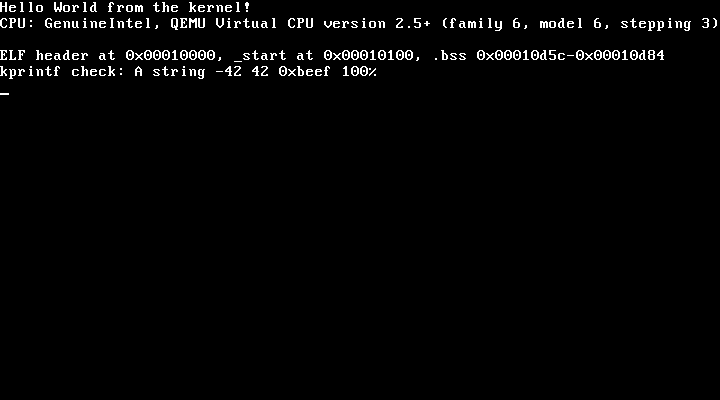
This is what the kernel of this chapter leaves on the screen,
captured from QEMU with the monitor command screendump:
10.6 A console, a string
library and kprintf
The two drivers each print one character. The rest of the kernel should not have to know that there are two of them, nor that there could be three one day. A thin layer gives one function to call:
console.c
/* console.c -- fan out kernel output to every device we can print on. */
#include "console.h"
#include "serial.h"
#include "vga.h"

void console_init(void)
{
    serial_init();
    vga_clear();
}

void putc(char c)
{
    serial_putc(c);
    vga_putc(c);
}

void puts(const char *s)
{
    while (*s != '\0')
        putc(*s++);
}
The names putc and puts are the ones of the
C library, and there is no conflict because there is no C library: we
compile with -ffreestanding -nostdlib, so these are the
only putc and puts the linker will ever see.
Note the order in putc: serial first. If the VGA driver has
a bug that hangs the machine, the character has already left through the
serial port.
10.6.1
string.c: why we write our own memcpy
A freestanding program has no libc, and that includes the functions everyone takes for granted. The kernel needs three of them:
string.c
/* string.c -- memset, memcpy, strlen without a libc. */
#include "string.h"

void *memset(void *dst, int value, size_t n)
{
    unsigned char *d = dst;

    while (n-- > 0)
        *d++ = (unsigned char)value;
    return dst;
}

void *memcpy(void *dst, const void *src, size_t n)
{
    unsigned char *d = dst;
    const unsigned char *s = src;

    while (n-- > 0)
        *d++ = *s++;
    return dst;
}

size_t strlen(const char *s)
{
    size_t n = 0;

    while (s[n] != '\0')
        n++;
    return n;
}
Byte-by-byte loops are slow, and a real kernel replaces them with
rep movsd or better; for now correctness is all we need.
There is a subtlety that makes memset and
memcpy mandatory even in a kernel that never calls them.
gcc is allowed to turn a struct assignment, the initialization of a
large array, or a loop it recognizes, into a call to memcpy
or memset, and it does so even with
-ffreestanding: the C standard requires a freestanding
implementation to provide only a few headers, but gcc’s documentation of
-ffreestanding and -nostdlib states that the
compiler may still emit calls to these two functions, together with
memmove and memcmp, and that a freestanding
program must provide them. A kernel that does not will fail to link one
day with an undefined reference to memcpy coming from a
line of C that contains no call at all. Our kernel calls
memcpy in two places, four times from cpuid.c
(the next section) and once from scroll():
$ objdump -d -M intel build/os/os | grep 'call.*mem'

   101e4:   e8 78 07 00 00          call   10961 <memcpy>
   101ff:   e8 5d 07 00 00          call   10961 <memcpy>
   1021a:   e8 42 07 00 00          call   10961 <memcpy>
   102ad:   e8 af 06 00 00          call   10961 <memcpy>
   10a88:   e8 d4 fe ff ff          call   10961 <memcpy>
10.6.2 printf.c: a
freestanding kprintf
printf is the function every C programmer debugs with,
and we want it in the kernel. Writing one is a good exercise in reading
the C standard. The hard part of printf is not the
formatting, it is the variable number of arguments, and C gives a
portable interface for that in <stdarg.h>:
va_list, va_start, va_arg and
va_end. Is that header available without a libc? Yes:
section 4, paragraph 6 of the C11 standard lists the headers a
freestanding implementation must provide, and
<stdarg.h> is one of them, together with
<stddef.h>, <stdint.h>,
<stdbool.h>, <limits.h>,
<float.h>, <iso646.h>,
<stdalign.h> and <stdnoreturn.h>.
They come with the compiler, not with the C library, because what they
describe depends on the compiler: on 32-bit x86 the arguments after the
format string are simply the next double words on the stack (chapter 4
explained the cdecl calling convention), and va_arg is a
pointer walking up that stack.
printf.c
/* printf.c -- a minimal kprintf.
 *
 * <stdarg.h> is one of the few headers available with -ffreestanding: it
 * comes from the compiler, not from a libc, because reading variadic
 * arguments depends on the calling convention only the compiler knows.
 * On 32-bit x86 (cdecl) the arguments simply sit on the stack above the
 * format string, each one 4 bytes (chapter 4).
 */
#include <stdarg.h>
#include <stdint.h>
#include "printf.h"
#include "console.h"

/* Print `value` in `base` (10 or 16).  Digits are produced from the least
   significant end, so collect them in a buffer and print it backwards.  32
   binary digits is the longest possible result, plus the terminator. */
static void print_unsigned(uint32_t value, unsigned base)
{
    static const char digits[] = "0123456789abcdef";
    char buf[33];
    int i = 0;

    do {
        buf[i++] = digits[value % base];
        value /= base;
    } while (value != 0);

    while (i > 0)
        putc(buf[--i]);
}

static void print_signed(int32_t value)
{
    if (value < 0) {
        putc('-');
        /* -INT32_MIN does not fit in an int32_t; the cast to unsigned and
           the negation of the unsigned value give the right magnitude. */
        print_unsigned((uint32_t)0 - (uint32_t)value, 10);
    } else {
        print_unsigned((uint32_t)value, 10);
    }
}

/* %p: always 8 hex digits so that addresses line up in the output. */
static void print_pointer(uint32_t value)
{
    int shift;

    puts("0x");
    for (shift = 28; shift >= 0; shift -= 4)
        putc("0123456789abcdef"[(value >> shift) & 0xF]);
}
Number formatting is the one algorithm in the file. Dividing by the
base gives the digits from the least significant end, which is the wrong
order for printing, so print_unsigned collects them in a
small buffer on the stack and prints the buffer backwards. A
do/while rather than while makes
sure that zero prints as 0 and not as nothing. The
static const char digits[] is the lookup table from a digit
value to its character, and because it is static const it
lives in .rodata, not on the stack: you can find it as
digits.0 in nm build/os/os.
print_signed has the comment that every implementer of
itoa eventually earns: negating INT32_MIN
overflows a signed integer, which is undefined behavior in C. Negating
it as an unsigned value, 0u - value, is defined and gives
the right magnitude, 2147483648.
print_pointer is deliberately different from
%x: it always prints 0x and exactly eight
digits, so that a column of addresses lines up and a short address is
visibly short. %x prints the significant digits and no
prefix, like the libc.
void kprintf(const char *fmt, ...)
{
    va_list args;
    const char *s;

    va_start(args, fmt);
    for (; *fmt != '\0'; fmt++) {
        if (*fmt != '%') {
            putc(*fmt);
            continue;
        }
        fmt++;                      /* skip the '%' and look at the conversion */
        switch (*fmt) {
        case 'c':
            /* char is promoted to int when passed through "..." */
            putc((char)va_arg(args, int));
            break;
        case 's':
            s = va_arg(args, const char *);
            puts(s != 0 ? s : "(null)");
            break;
        case 'd':
            print_signed(va_arg(args, int32_t));
            break;
        case 'u':
            print_unsigned(va_arg(args, uint32_t), 10);
            break;
        case 'x':
            print_unsigned(va_arg(args, uint32_t), 16);
            break;
        case 'p':
            print_pointer((uint32_t)va_arg(args, void *));
            break;
        case '%':
            putc('%');
            break;
        case '\0':                  /* "%" at the very end of the format */
            putc('%');
            va_end(args);
            return;
        default:                    /* unknown conversion: print it as is */
            putc('%');
            putc(*fmt);
            break;
        }
    }
    va_end(args);
}
The conversion loop walks the format string and copies every
character that is not a %. After a %, one
character selects the conversion, and va_arg(args, type)
fetches the next argument with the type the conversion expects. Two
details come straight from the C standard. case 'c' fetches
an int, not a char: arguments passed through
... undergo the default argument promotions (C11,
section 6.5.2.2), so a char arrives as an int
and must be fetched as one; asking va_arg for a
char is undefined behavior and gcc warns about it. And
case 'p' fetches a void *, because that is
what the caller must pass; on our 32-bit kernel a pointer is a
uint32_t and the cast is exact.
The supported conversions are %c, %s,
%d, %u, %x, %p and
%%. There are no field widths, no flags, no
long long: this is a debugging aid, and every line of it
should be understandable in one reading. The header says so:
printf.h
#ifndef PRINTF_H
#define PRINTF_H

/* Formatted output to the console.  Supported conversions:
     %c  character        %s  string            %d  signed decimal
     %u  unsigned decimal %x  lowercase hex     %p  pointer (0x + 8 hex digits)
     %%  a literal percent sign
   No field widths, no flags, no 64-bit integers: this is a kernel debugging
   aid, not a libc. */
void kprintf(const char *fmt, ...);

#endif
10.6.3 panic()
The last piece is the function the kernel calls when it finds itself in a state it does not understand: a corrupt table, an exception it cannot handle, an allocation that cannot fail but did. Continuing would turn one bug into many, so the kernel says what happened and stops.
panic.c
/* panic.c -- the kernel's last words. */
#include "panic.h"
#include "printf.h"

void panic(const char *msg)
{
    kprintf("\nKERNEL PANIC: %s\n", msg);
    for (;;)
        asm volatile("cli; hlt");
}
cli disables interrupts and hlt stops the
CPU until the next one, so the loop never spins; it is the same idle
loop as at the end of kmain and in entry.asm.
The prototype in panic.h carries
__attribute__((noreturn)), which tells gcc that the
function never comes back, so that it does not warn about code paths
after a panic() call that appear to fall off the end of a
function without a return value. Chapter 11 will teach
panic() to print the registers of the faulting instruction;
for now it prints a line.
To see it, add panic("nothing left to do"); after the
third kprintf in kmain and rebuild. The serial
output ends with:
Hello World from the kernel!
CPU: GenuineIntel, QEMU Virtual CPU version 2.5+ (family 6, model 6, stepping 3)
ELF header at 0x00010000, _start at 0x00010100, .bss 0x00010d74-0x00010d9c
kprintf check: A string -42 42 0xbeef 100%

KERNEL PANIC: nothing left to do
The .bss addresses have moved up compared with the
output below, because the message string and the call made the kernel a
few bytes longer. That is the kind of thing %p in the third
line is there to show. (The second line, CPU: ..., is the
subject of the next section.)
10.7 Who made this CPU
Now that the kernel can print, the first thing worth printing is what it is running on. Chapter 3 explained the two-vendor situation of the x86: Intel designed the architecture, AMD implements the same instruction set under a license that goes back to 1982, and the two companies publish separate manuals for what is, as far as our kernel is concerned, the same machine. A kernel that must run on both has a practical question to answer before it trusts a vendor-specific feature: whose chip is this? The answer comes from one instruction.
10.7.1 The CPUID instruction
cpuid was added with the Pentium in 1993. It takes a
number in EAX, the leaf, and fills
EAX, EBX, ECX and
EDX with information about the processor: who made it,
which model it is, which features it has, how its caches are organized.
Read the instruction’s page in the Intel SDM Volume 2A, under “CPUID—CPU
Identification”, for the register conventions, then Volume 1, chapter 21
“Processor Identification and Feature Determination”, which is the
chapter written for the people who use it: section 21.1 gives the
guidelines, section 21.2 explains the brand string, and section 21.3
lists every leaf with the meaning of every bit. We use three leaves:
Leaf 0 returns the highest leaf the processor supports in
EAX, and the vendor string in the other three registers:GenuineIntelon an Intel processor,AuthenticAMDon an AMD one.Leaf 1 returns the family, model and stepping in
EAX, three numbers that identify the design, and two registers full of feature bits, among themEDXbit 4, which says that the processor has the time-stamp counter of chapter 13, andEDXbit 9, the local APIC of chapter 17.Leaves
0x80000002to0x80000004return the brand string, 48 characters of marketing text such asIntel(R) Core(TM) i7-8650U CPU @ 1.90GHz. These are extended leaves, with bit 31 set in the leaf number; section 21.1.3 explains that they form a second range, whose highest member is returned by leaf0x80000000, and section 21.2.1 that the brand string exists only when that highest member is at least0x80000004.
Section 21.1.1 also says how a program finds out whether
cpuid exists at all: bit 21 of EFLAGS, the
ID flag, can be toggled by software if and only if the
instruction is supported, and executing it on an older processor raises
the invalid-opcode exception, #UD. Every processor made
since the Pentium has it, and so does every processor QEMU emulates, so
our kernel skips the test; a kernel that may boot on a 486 cannot.
10.7.2 cpuid.c
cpuid.h
#ifndef CPUID_H
#define CPUID_H

#include <stdint.h>

/* The CPUID instruction: put a "leaf" number in EAX, execute it, and the
   processor describes itself in EAX, EBX, ECX and EDX (Intel SDM Vol. 2A,
   the CPUID instruction; Vol. 1, chapter 21 "Processor Identification and
   Feature Determination").  AMD documents the same leaves in the AMD64
   Architecture Programmer's Manual, Volume 3, under CPUID. */
struct cpuid_regs {
    uint32_t eax, ebx, ecx, edx;
};

/* Execute CPUID for `leaf` (sub-leaf 0) and store the four registers. */
void cpuid(uint32_t leaf, struct cpuid_regs *r);

/* Leaf 0: the 12-character vendor string, "GenuineIntel" or "AuthenticAMD",
   NUL-terminated; `out` needs 13 bytes. */
void cpuid_vendor(char out[13]);

/* Leaves 0x80000002-0x80000004: the 48-character brand string, such as
   "QEMU Virtual CPU version 2.5+", NUL-terminated; `out` needs 49 bytes.
   Returns 0 (and an empty string) if the processor has none. */
int cpuid_brand(char out[49]);

/* Leaf 1: the "display" family, model and stepping of the processor. */
void cpuid_family_model(uint32_t *family, uint32_t *model, uint32_t *stepping);

/* One line on the console: "CPU: <vendor>, <brand> (family F, model M, stepping S)". */
void cpuid_print(void);

#endif
cpuid.c
/* cpuid.c -- who made this CPU, and which one is it.
 *
 * CPUID takes a leaf number in EAX and answers in EAX, EBX, ECX and EDX.
 * Leaf 0 returns the highest basic leaf and the vendor string, leaf 1 the
 * family, model and stepping (and the feature flags), and the "extended"
 * leaves 0x80000002 to 0x80000004 a human-readable brand string (Intel SDM
 * Vol. 1, chapter 21 "Processor Identification and Feature Determination",
 * sections 21.2 and 21.3; Vol. 2A, the CPUID instruction).  Every vendor
 * implements these leaves the same way; what differs between vendors is
 * the meaning of some feature bits, which is why the manual says to look
 * at the vendor string first.
 */
#include "cpuid.h"
#include "printf.h"
#include "string.h"

void cpuid(uint32_t leaf, struct cpuid_regs *r)
{
    /* Four outputs, one per register, and two inputs: the leaf in EAX and
       0 in ECX, the sub-leaf number that some leaves (not ours) use. */
    asm volatile("cpuid"
                 : "=a"(r->eax), "=b"(r->ebx), "=c"(r->ecx), "=d"(r->edx)
                 : "a"(leaf), "c"(0));
}

void cpuid_vendor(char out[13])
{
    struct cpuid_regs r;

    cpuid(0, &r);
    /* The twelve characters are spread over EBX, EDX and ECX, in that
       order, four per register with the first character in the low byte:
       "Genu" in EBX, "ineI" in EDX, "ntel" in ECX.  On a little-endian
       machine, copying the registers in that order reassembles the string
       (SDM Vol. 1, "CPUID.00H"). */
    memcpy(out + 0, &r.ebx, 4);
    memcpy(out + 4, &r.edx, 4);
    memcpy(out + 8, &r.ecx, 4);
    out[12] = '\0';
}

int cpuid_brand(char out[49])
{
    struct cpuid_regs r;
    uint32_t leaf;

    /* Leaf 0x80000000 returns the highest extended leaf; the brand string
       exists only if that is at least 0x80000004 (SDM Vol. 1, section
       21.2.1 and Figure 21-1). */
    cpuid(0x80000000, &r);
    if (r.eax < 0x80000004) {
        out[0] = '\0';
        return 0;
    }
    for (leaf = 0x80000002; leaf <= 0x80000004; leaf++) {
        uint32_t words[4];
        char *dst = out + (leaf - 0x80000002) * 16;

        cpuid(leaf, &r);
        /* This time the order is the natural one: EAX, EBX, ECX, EDX. */
        words[0] = r.eax;
        words[1] = r.ebx;
        words[2] = r.ecx;
        words[3] = r.edx;
        memcpy(dst, words, 16);
    }
    out[48] = '\0';
    return 1;
}

void cpuid_family_model(uint32_t *family, uint32_t *model, uint32_t *stepping)
{
    struct cpuid_regs r;
    uint32_t family_id, model_id;

    cpuid(1, &r);
    /* EAX of leaf 1: bits 3:0 stepping, 7:4 model, 11:8 family, 19:16
       extended model, 27:20 extended family.  The extended fields exist
       because four bits ran out: they count only when the family is 0xF
       (extended family) or 6 and 0xF (extended model), per the rules under
       "CPUID.01H:EAX" in SDM Vol. 1, chapter 21. */
    *stepping = r.eax & 0xF;
    model_id  = (r.eax >> 4) & 0xF;
    family_id = (r.eax >> 8) & 0xF;
    *family = family_id;
    if (family_id == 0xF)
        *family += (r.eax >> 20) & 0xFF;
    *model = model_id;
    if (family_id == 0x6 || family_id == 0xF)
        *model += ((r.eax >> 16) & 0xF) << 4;
}

void cpuid_print(void)
{
    char vendor[13], brand[49];
    const char *b = brand;
    uint32_t family, model, stepping;

    cpuid_vendor(vendor);
    if (!cpuid_brand(brand))
        b = "(no brand string)";
    while (*b == ' ')                   /* some brand strings are right-aligned */
        b++;
    cpuid_family_model(&family, &model, &stepping);
    kprintf("CPU: %s, %s (family %u, model %u, stepping %u)\n",
            vendor, b, family, model, stepping);
}
The asm statement in cpuid() is the second
one of this chapter, and it uses the parts of the extended-asm syntax
that io.h did not need. There are four outputs,
one per register, with the constraints a, b,
c and d, which name the four general registers
the instruction writes; "=b"(r->ebx) says “whatever is
in EBX afterwards goes into this field”. The two
inputs put the leaf in EAX and zero in
ECX: some leaves, not ours, take a sub-leaf number
in ECX, and the manual asks that it be set for all of them.
An operand can be both an input and an output with different C
expressions, which is the case of EAX here. There is no
clobber list because every register the instruction touches is an
operand. cpuid is also a serializing instruction
(Volume 1, section 21.1.7): it waits for every previous instruction to
finish before it executes, which is why kernels sometimes use it for
that effect alone; the volatile keeps the compiler from
moving or removing it, as for the port accesses.
cpuid_vendor contains the trick everyone meets once. The
twelve bytes of the vendor string are returned in three registers, but
not in the order a programmer would guess: the first four characters are
in EBX, the next four in EDX, and the last
four in ECX. Within a register, the first character is in
the low byte: leaf 0 on an Intel processor returns
EBX = 0x756e6547, which read as little-endian bytes is
47 65 6e 75, G, e,
n, u. So memcpy of the three
registers, in the order EBX, EDX,
ECX, into a 12-byte array, reassembles the string, because
the kernel runs on a little-endian machine and a register stored to
memory lands low byte first. The manual gives exactly these three
hexadecimal values under “CPUID.00H”. The brand string of the extended
leaves is returned in the natural order, EAX,
EBX, ECX, EDX, sixteen characters
per leaf, three leaves; the function copies the four registers through
an array so that the order is explicit rather than a property of the
layout of struct cpuid_regs.
cpuid_family_model applies the rule stated under
“CPUID.01H:EAX” in chapter 21. The family and model were four-bit fields
in 1993, and both ran out: Intel’s P6 design, the Pentium Pro of 1995,
is family 6, and every Intel core design since then has stayed in family
6 with a growing model number, so an extended model field was
added above and, for the Pentium 4’s family 15, an extended
family field. The two if statements are the manual’s
pseudo-code transcribed, with the test made on the raw family field and
not on the combined one.
10.7.3 Asking the processor
One line in kmain, right after the greeting:
    kprintf("Hello World from the kernel!\n");
    cpuid_print();
and the kernel reports:
Hello World from the kernel!
CPU: GenuineIntel, QEMU Virtual CPU version 2.5+ (family 6, model 6, stepping 3)
QEMU’s default processor model for qemu-system-i386
claims to be an Intel processor of family 6, model 6, numbers that Intel
gave to the Pentium II generation, and its brand string says honestly
what it is. The three numbers are what an operating system uses to work
around the errata of a given design, and what /proc/cpuinfo
on Linux prints as cpu family, model and
stepping; compare the line with the output of
grep -m1 -A4 vendor_id /proc/cpuinfo on the host, which
comes from the same instruction.
A word on the two manuals. AMD’s processors answer the same leaves
with the same layout: leaf 0 returns AuthenticAMD, leaf 1
the family and model, the extended leaves the brand string, and the
AMD64 Architecture Programmer’s Manual, Volume 3, documents
CPUID in its own words with its own tables. The
architecture is shared; the manuals are not. What is not shared
is the meaning of some of the feature bits, in particular in the
extended leaves, where each vendor has placed its own extensions, and
the family numbers, which are assigned independently: family 6 means a
P6 descendant on an Intel chip and the 1999 Athlon on an AMD one. That
is why section 21.1.1 of the Intel manual opens with the advice to test
for GenuineIntel before interpreting anything else, and why
a kernel that supports both vendors reads the vendor string first and
then consults the right manual.
Exercise 10.2. QEMU can pretend to be a different
processor: qemu-system-i386 -cpu help lists the models it
knows, and -cpu EPYC (or Opteron_G1, or any
other AMD model from the list) selects one. Add the option to the
qemu target of the Makefile, or run the command of
tools/serial-test.sh by hand with it, and watch the vendor
string change. What else changes in the brand string, and in the family
and model from leaf 1? Look the family number up in AMD’s manual, and
explain the warnings QEMU prints about features it cannot emulate: which
leaf and which bit does each name, and what would a kernel that trusted
leaf 1 blindly conclude from them?
10.8 The kernel talks
Here is the whole of kernel.c for this chapter:
kernel.c
/* kernel.c -- chapter 10: the kernel can talk. */
#include <stdint.h>
#include "gdt.h"
#include "console.h"
#include "printf.h"
#include "cpuid.h"

/* Symbols defined by the linker script and entry.asm.  Declaring them as
   arrays of char means "a thing at this address" without pretending it has
   a size; only the address is used. */
extern char _start[];
extern char __bss_start[];
extern char __bss_end[];

void kmain(void)
{
    gdt_init();
    console_init();

    kprintf("Hello World from the kernel!\n");
    cpuid_print();
    kprintf("ELF header at %p, _start at %p, .bss %p-%p\n",
            (void *)0x10000, _start, __bss_start, __bss_end);
    kprintf("kprintf check: %c %s %d %u 0x%x %d%%\n",
            'A', "string", -42, 42u, 0xBEEF, 100);

    for (;;)
        asm volatile("cli; hlt");
}
The first line is the Hello World, and the second the processor’s
identity from the previous section. The third prints the addresses that
chapters 8 and 9 made us compute by hand: where the ELF header was
loaded, where _start is, and the extent of
.bss that entry.asm zeroed.
_start, __bss_start and __bss_end
are not C variables, they are symbols from entry.asm and
from the linker script; declaring them as
extern char name[] is the standard idiom for “I only want
the address of this”. The fourth line exercises every conversion
once.
Building is the same make as in chapter 9; the only
change to the Makefiles is that os/Makefile picks up the
new .c files through its wildcard, and that
the top-level qemu target now passes
-serial stdio to QEMU:
Makefile (excerpt)
# -S stops the CPU before the first instruction; -gdb opens a gdb stub.
# -serial stdio: whatever the kernel writes to COM1 appears in this terminal.
qemu: bootdisk
    qemu-system-i386 -machine q35 -drive format=raw,file=$(DISK_IMG),if=ide -serial stdio -gdb tcp::26000 -S
$ make
make -C os
make[1]: Entering directory '/work/code/chapter10/os/os'
mkdir -p ../build/os
nasm -f elf32 -F dwarf -g entry.asm -o ../build/os/entry.o
mkdir -p ../build/os
gcc -ffreestanding -nostdlib -m32 -no-pie -fno-pie -fno-asynchronous-unwind-tables -fcf-protection=none -fno-stack-protector -O0 -gdwarf-4 -ggdb3 -Wall -Wextra -c console.c -o ../build/os/console.o
....eight more gcc lines omitted....
ld -m elf_i386 -nmagic --no-warn-rwx-segments -T os.lds ../build/os/entry.o ../build/os/console.o ../build/os/cpuid.o ../build/os/gdt.o ../build/os/kernel.o ../build/os/panic.o ../build/os/printf.o ../build/os/serial.o ../build/os/string.o ../build/os/vga.o -o ../build/os/os
make[1]: Leaving directory '/work/code/chapter10/os/os'
make -C bootloader KERNEL_SECTORS=$(( ($(stat -c %s build/os/os) + 511) / 512 ))
make[1]: Entering directory '/work/code/chapter10/os/bootloader'
mkdir -p ../build/bootloader
nasm -f elf -F dwarf -g -DKERNEL_SECTORS=70 bootloader.asm -o ../build/bootloader/bootloader.o
ld -m elf_i386 --no-warn-rwx-segments -T bootloader.lds ../build/bootloader/bootloader.o -o ../build/bootloader/bootloader.elf
objcopy -O binary ../build/bootloader/bootloader.elf ../build/bootloader/bootloader.bin
make[1]: Leaving directory '/work/code/chapter10/os/bootloader'
dd if=/dev/zero of=build/disk.img bs=512 count=8192 status=none
dd conv=notrunc if=build/bootloader/bootloader.bin of=build/disk.img bs=512 count=1 seek=0 status=none
dd conv=notrunc if=build/os/os of=build/disk.img bs=512 seek=1 status=noneThe build is clean under -Wall -Wextra. Notice
KERNEL_SECTORS=70: the kernel file is now 35616 bytes, and
the bootloader of chapter 9 is told at assembly time how many sectors to
read. Most of those bytes are DWARF debugging information for gdb; the
part that matters to the CPU is much smaller:
$ readelf -l build/os/os

Elf file type is EXEC (Executable file)
Entry point 0x10100
There are 2 program headers, starting at offset 52

Program Headers:
  Type           Offset   VirtAddr   PhysAddr   FileSiz MemSiz  Flg Align
  PHDR           0x000034 0x00010034 0x00010034 0x00040 0x00040 R   0x4
  LOAD           0x000000 0x00010000 0x00010000 0x00d59 0x00d84 RWE 0x100

 Section to Segment mapping:
  Segment Sections...
   00
   01     .text .rodata .bss
The single LOAD segment is 0xd59 = 3417
bytes in the file and 0xd84 = 3460 bytes in memory; the
difference is .bss. The bootloader copies the whole 70
sectors anyway, debugging sections included, because it does not parse
program headers (chapter 8). The .bss range printed by the
kernel, 0x00010d5c to 0x00010d84, is exactly
where this table says the segment’s MemSiz extends past its
FileSiz (the three bytes between 0xd59 and
0xd5c are alignment padding before .bss).
Now run it. In one terminal:
$ make qemuThe QEMU window opens, black, with the CPU stopped at its first
instruction. In a second terminal, make gdb connects and
sets a breakpoint at kmain, as in chapter 9; type
c and the machine boots. Four lines appear on the QEMU
window, as in the screenshot above, and the same four lines appear
in the first terminal, under the make output,
because -serial stdio connects COM1 to the terminal QEMU
was started from. The serial lines arrive first: putc
writes to the serial port before the VGA cell.
Look closely at the screenshot and you will see five rows used for
four lines: the CPU: line is followed by an empty row,
which the serial terminal does not show. The line is exactly 80
characters long. vga_putc stored its last character in
column 79, advanced the column to 80, and wrapped to the next row at
once; then the \n arrived and moved down a second time. The
serial terminal behaves differently because a real terminal, and the
terminal emulator on your screen, defers the wrap: the cursor
stays past the last column until the next printable character arrives,
so a newline right after a full line costs nothing. The VGA driver could
do the same with a flag; the output of the next chapters never fills a
row, so we leave the defect in place and note it.
10.8.1 make test
The test target does not open a window at all:
Makefile (excerpt)
# Boot headless with COM1 captured to a file and wait for the greeting.
test: bootdisk
    ../../../tools/serial-test.sh $(DISK_IMG) "Hello World from the kernel!"
$ make test
....build output omitted....
../../../tools/serial-test.sh build/disk.img "Hello World from the kernel!"
serial-test: ok, found "Hello World from the kernel!"
--- serial output ---
Hello World from the kernel!
CPU: GenuineIntel, QEMU Virtual CPU version 2.5+ (family 6, model 6, stepping 3)
ELF header at 0x00010000, _start at 0x00010100, .bss 0x00010d5c-0x00010d84
kprintf check: A string -42 42 0xbeef 100%
qemu-system-i386: terminating on signal 15 from pid 83 (/bin/sh)The script is thirty lines of shell. Chapter 14 and Appendix C later
added a few options to it (further strings that must all appear, and the
QEMU_MACHINE, QEMU_DRIVE_ARGS and
QEMU_BIN variables); with none of them given it does
exactly what this chapter needs:
tools/serial-test.sh
#!/bin/sh
# Boot a disk image headless in QEMU with the serial port captured, wait for
# a given string to appear on it, and exit 0.  Used from Part III onwards.
#
#   serial-test.sh <disk.img> "<expected text>" [timeout-seconds] ["<more expected text>"...]
#
# Chapter 14 additions: every further argument is another string that
# must also appear; QEMU_MACHINE overrides the machine type and
# QEMU_DRIVE_ARGS replaces the default `-drive` option (the chapter 14
# Makefile uses it to attach the disk to a PIIX3 IDE controller).
# Appendix C addition: QEMU_BIN selects the emulator binary (default
# qemu-system-i386; the long-mode example needs qemu-system-x86_64).
set -e
IMG="$1"; EXPECT="$2"; LIMIT="${3:-15}"
shift; shift; [ $# -gt 0 ] && shift
MACHINE="${QEMU_MACHINE:-q35}"
QEMU="${QEMU_BIN:-qemu-system-i386}"   # appendix C: qemu-system-x86_64 for a 64-bit guest
DRIVE="${QEMU_DRIVE_ARGS:--drive format=raw,file=$IMG,if=ide}"
LOG=$(mktemp)
# shellcheck disable=SC2086  # DRIVE is deliberately split into words
"$QEMU" -machine "$MACHINE" $DRIVE \
    -display none -monitor none -serial "file:$LOG" -no-reboot &
QPID=$!
trap 'kill $QPID 2>/dev/null; wait $QPID 2>/dev/null; rm -f "$LOG"' EXIT
all_found() {
  grep -qF -- "$EXPECT" "$LOG" 2>/dev/null || return 1
  for e in "$@"; do grep -qF -- "$e" "$LOG" 2>/dev/null || return 1; done
}
i=0
while [ $i -lt "$LIMIT" ]; do
  if all_found "$@"; then
    echo "serial-test: ok, found \"$EXPECT\"$(for e in "$@"; do printf ' and "%s"' "$e"; done)"
    echo "--- serial output ---"; cat "$LOG"; exit 0
  fi
  sleep 1; i=$((i+1))
done
echo "serial-test: FAILED, expected text not seen within ${LIMIT}s. Serial output:"; cat "$LOG"; exit 1
QEMU (qemu-system-i386 on the q35 machine,
with the disk attached as in the qemu target) is started in
the background with -display none (no window),
-monitor none (no monitor on the terminal either) and
-serial file:$LOG, which writes everything the kernel sends
to COM1 into a temporary file. -no-reboot makes QEMU stop
instead of rebooting if the kernel triple-faults, so that a crashing
kernel fails the test instead of looping forever. The script then polls
the file once a second, for 15 seconds by default, until the expected
text appears (all_found checks the string from the command
line, and any further ones), prints the whole log so that you see what
the kernel said, and kills QEMU on the way out through the
trap. A kernel that prints nothing, or prints something
else, makes make test exit with status 1, and that is what
the continuous integration of the repository checks. The workflow in
.github/workflows/ci.yml builds the container of chapter 0
and runs, for every chapter directory:
for d in code/chapter*/os; do
  echo "=== $d"; make -C "$d" clean >/dev/null; make -C "$d" test
done
Every change to the book’s code is therefore booted, and the kernel’s own output is the evidence. This is the “serial port first” decision of the second edition, and it is why this chapter comes before interrupts rather than after.
10.9 Debugging with the serial port and gdb
A few techniques that the rest of Part III will use constantly.
Capture the serial port to a file.
-serial stdio is convenient while you watch;
-serial file: is what you want when the kernel prints a
lot, or crashes and reboots, or when you want to look at the bytes. This
is the test script’s command without the script:
$ qemu-system-i386 -machine q35 -drive format=raw,file=build/disk.img,if=ide -display none -serial file:build/serial.logStop QEMU with Ctrl-C after a few seconds, then look at the file with
hexdump:
$ hexdump -C build/serial.log | head -4

00000000  48 65 6c 6c 6f 20 57 6f  72 6c 64 20 66 72 6f 6d  |Hello World from|
00000010  20 74 68 65 20 6b 65 72  6e 65 6c 21 0d 0a 43 50  | the kernel!..CP|
00000020  55 3a 20 47 65 6e 75 69  6e 65 49 6e 74 65 6c 2c  |U: GenuineIntel,|
00000030  20 51 45 4d 55 20 56 69  72 74 75 61 6c 20 43 50  | QEMU Virtual CP|
There is the 0d 0a that serial_putc sends
for every \n. When the output is piped through
cat -A the pair shows as ^M$, which is how you
will recognize it in a terminal.
Print before anything else works.
serial_init and serial_putc depend on nothing:
no GDT of our own, no .bss, no stack beyond what a function
call needs. If you are ever unsure whether the kernel even reaches
kmain, calling
serial_init(); serial_write("here\n"); as the first two
lines is the fastest answer. The screen needs vga_clear to
have run and the cursor variables to be sane; the serial port does
not.
Look at the devices from gdb. gdb cannot execute
in on the emulated machine, but the QEMU monitor can, and
gdb’s monitor command forwards anything to it. The monitor
command i /b port reads a byte from an I/O port. Start
make qemu in one terminal and make gdb in
another, and when the breakpoint at kmain hits:
(gdb) x/8xh 0xb8000
0xb8000:    0x0753  0x0765  0x0761  0x0742  0x0749  0x074f  0x0753  0x0720
Eight cells of the frame buffer before our kernel touched it:
S, e, a, B,
I, O, S, with the BIOS attribute
0x07, light gray on black. SeaBIOS, the BIOS of QEMU,
printed its name there during the boot. Three next commands
execute gdt_init and console_init, and a
fourth the first kprintf:
(gdb) next
17      gdt_init();
(gdb) next
18      console_init();
(gdb) next
20      kprintf("Hello World from the kernel!\n");
(gdb) x/8xh 0xb8000
0xb8000:    0x0f20  0x0f20  0x0f20  0x0f20  0x0f20  0x0f20  0x0f20  0x0f20
(gdb) next
21      cpuid_print();
(gdb) x/8xh 0xb8000
0xb8000:    0x0f48  0x0f65  0x0f6c  0x0f6c  0x0f6f  0x0f20  0x0f57  0x0f6f
(gdb) p cursor_row
$1 = 1
(gdb) p cursor_col
$2 = 0
After vga_clear every cell is a space with attribute
0x0F; after the first line, Hello Wo is in the
first eight cells and the driver’s cursor is at the start of row 1. Now
the UART, through the monitor:
(gdb) monitor i /b 0x3fd
portb[0x03fd] = 0x60
(gdb) monitor i /b 0x3fb
portb[0x03fb] = 0x03
The line status register reads 0x60: bit 5, transmitter
holding register empty, and bit 6, transmitter empty, both set, which is
what an idle UART looks like and what serial_putc waits
for. The line control register still holds the 0x03 that
serial_init wrote. If a serial driver ever prints nothing,
these two reads are the first thing to check: a line control register
that still has DLAB set, for instance, means every byte went into the
divisor latch instead of the transmit register.
Finally, the layers of the console seen from inside:
(gdb) b serial_putc
Breakpoint 2 at 0x108b9: file serial.c, line 39.
(gdb) c

Breakpoint 2, serial_putc (c=67 'C') at serial.c:39
39      if (c == '\n')
(gdb) bt
#0  serial_putc (c=67 'C') at serial.c:39
#1  0x0001014b in putc (c=67 'C') at console.c:14
#2  0x000106a0 in kprintf (fmt=0x10c14 "CPU: %s, %s (family %u, model %u, stepping %u)\n") at printf.c:62
#3  0x000103d9 in cpuid_print () at cpuid.c:105
#4  0x0001050c in kmain () at kernel.c:21
#5  0x0001011b in _start () at entry.asm:30
The backtrace is the whole chapter in six lines: _start
in assembly calls kmain, which calls
cpuid_print, which calls kprintf with a format
string that lives in .rodata at 0x10c14, which
calls putc for the C of “CPU”, which calls the
serial driver first.
10.10 Exercises
Exercise 10.3. Add %o (octal) to
kprintf. Then add a minimal field width with zero padding,
so that %08x prints 0000beef: parse the digits
after the %, and pass the width and the pad character down
to print_unsigned. Check that %p and
%08x now print the same thing for an address, and decide
whether print_pointer should still exist.
Exercise 10.4. Give the VGA driver colors: a
vga_set_colour(uint8_t fg, uint8_t bg) that changes the
attribute used by cell(), following the table of this
chapter. Make panic() print its message in white on red,
and verify in gdb with x/8xh 0xb8000 that the attribute
bytes changed. Then find in the FreeVGA “Attribute Controller Registers”
page which bit decides whether bit 7 of the attribute blinks the
character or brightens the background.
Exercise 10.5. The UART receives as well as it
sends. Bit 0 of the line status register, data ready, is set
when a byte is waiting in the receive buffer. Write
serial_getc() by polling that bit and reading
REG_DATA, and replace the idle loop at the end of
kmain with a loop that echoes every received character back
through kprintf("%c"). Type in the terminal where
make qemu runs: QEMU sends your keystrokes to COM1. Why do
you see each character once and not twice?
Exercise 10.6. Remove the \r from
serial_putc, rebuild, and run make qemu: the
terminal shows the staircase. Then run with
-serial file:build/serial.log instead and type
cat build/serial.log: the file looks fine. Explain the
difference; stty -a and the onlcr flag of the
terminal driver are the keywords. Put the \r back.
Exercise 10.7. Change the divisor in
serial_init to 12 (9600 baud) and run
make test. It still passes. Explain why QEMU does not care
about the baud rate, and what a terminal program set to 38400 baud would
show if the kernel ran on real hardware with this divisor. If you have a
machine with a real serial port, or a USB serial adapter, and a
null-modem cable, try it: this is the one experiment in the book that
QEMU cannot reproduce.
Exercise 10.8. Make panic() print the
stack pointer and the return address of its caller, so that a panic can
be located without a debugger. Read the stack pointer with an inline
asm statement that has an output operand
("=r"(esp) and the template "mov %%esp, %0"),
and use gcc’s __builtin_return_address(0) for the second.
Print both with %p, and check them against
nm build/os/os and the bt of a gdb session
stopped in panic.
10.11 Check your understanding
The serial driver polls bit 5 of the line status register before every byte. What would go wrong if
serial_putcskipped the check and wrote to the transmit register immediately, and why does QEMU make that bug impossible to see?putcwrites to the serial port before the VGA buffer, andmake testonly reads the serial port. Suppose the order were reversed and the VGA driver had a bug that hung the machine on the first scroll. Which lines of the test log would you get, and what would the continuous integration conclude from them?volatileappears on the VGA frame buffer pointer and on everyasmstatement inio.h, but the kernel is compiled with-O0, where it changes nothing. Why keep it, and what would the first symptom be, at-O2, if it were missing frominb?The vendor string of leaf 0 comes out of
EBX,EDX,ECXin that order andmemcpyreassembles it. What wouldcpuid_vendorprint on a hypothetical big-endian machine with the same registers, and what does that tell you about the code’s dependence on the architecture it runs on?The
CPU:line is followed by an empty row on the VGA screen but not on the serial terminal. Explain the two behaviors fromvga_putcand from what a terminal does at the end of a line, and say what one-line change to the driver would make the two agree.A
#UDexception is whatcpuidraises on a processor that does not have it. Our kernel executes the instruction before chapter 11 installs any exception handler. What happens on such a processor, concretely, from thecpuidinstruction to the state of the machine a few microseconds later?kprintffetches a%cargument withva_arg(args, int)and a%pargument withva_arg(args, void *). Both are four bytes on this machine, so why wouldva_arg(args, char)still be wrong, and what would a 64-bit build of the same function have to change?