5 The Anatomy of a Program
Every program consists of code and data, and only those two components make up a program. However, if a program consisted purely of code and data of its own, then from the perspective of an operating system (as well as of a human), there would be no way to know which block of binary is a program and which is just raw data, where in the program to start execution, which region of memory should be protected and which is free to modify. For that reason, each program carries extra metadata to communicate with the operating system how to handle the program.
When a source file is compiled, the generated machine code is stored into an object file, which is just a block of binary. One or more object files can be combined to produce an executable binary, which is a complete program runnable in an operating system.
readelf is a program that recognizes and displays the
ELF metadata of a binary file, be it an object file or an executable
binary. ELF, or
Executable and
Linkable
Format, is the content at the very
beginning of an executable to provide an operating system the necessary
information to load the executable into main memory and run it. ELF can
be thought of as similar to the table of contents of a book. In a book,
a table of contents lists the page numbers of the main sections,
subsections, sometimes even figures and tables for easy lookup.
Similarly, ELF lists various sections used for code and data, and the
memory addresses of each symbol along with other information.
An ELF binary is composed of:
An ELF header: the very first section of an executable that describes the file’s organization.
A program header table: an array of fixed-size structures that describes the segments of an executable.
A section header table: an array of fixed-size structures that describes the sections of an executable.
Segments and sections are the main content of an ELF binary, which are the code and data, divided into chunks of different purposes.
A segment is a composition of zero or more sections and is directly loaded by an operating system at runtime.
A section is a block of binary that is either:
actual program code and data that is available in memory when a program runs.
metadata about other sections used only in the linking process, which disappears from the final executable.
The linker uses sections to build segments.
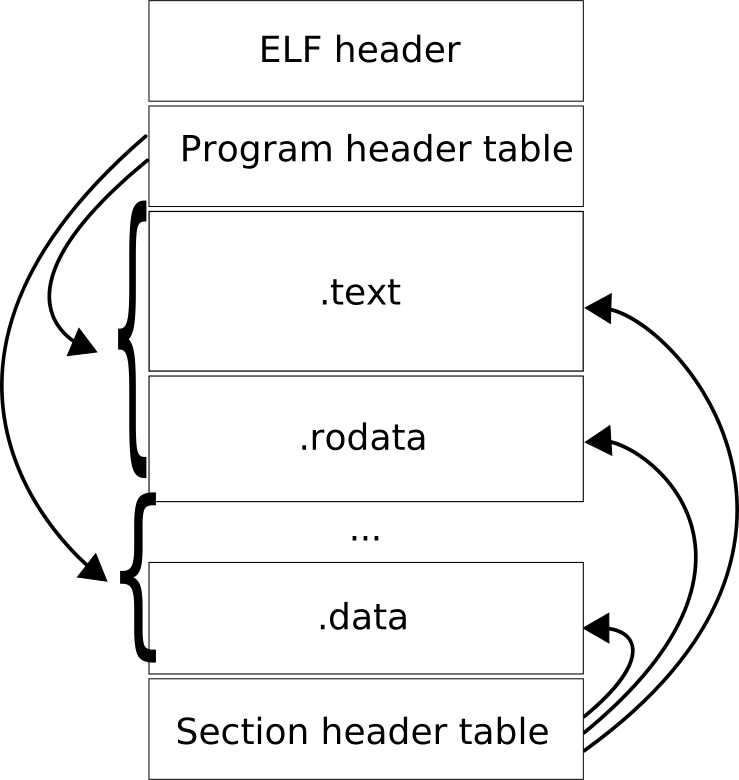
Later we will compile our kernel as an ELF executable with GCC, and explicitly specify how segments are created and where they are loaded in memory through the use of a linker script, a text file that instructs the linker how to generate a binary. For now, we will examine the anatomy of an ELF executable in detail.
Throughout the chapter, the executable under the microscope is the following Hello World:
hello.c
#include <stdio.h>

int main(int argc, char *argv[])
{
    printf("Hello World\n");
    return 0;
}
The listings of the first part of this chapter are of a
64-bit executable, so that you see the 64-bit variant of the
format once: the structures are the same as in a 32-bit file, only the
width of the addresses and the size of the headers differ. For this one
program we therefore leave -m32 out of the flags of chapter
0:
$ gcc -no-pie -fno-pie -fno-asynchronous-unwind-tables -fcf-protection=none -O0 hello.c -o helloFrom Example 5.7 onward, every program is compiled with
gcc $BOOKFLAGS, that is, as a 32-bit executable like
everywhere else in the book.
5.1 Reference documents
The ELF specification is bundled as a man page in
Linux:
$ man elfIt is a useful resource to understand and implement ELF. However, it will be much easier to use after you finish this chapter, as the specification mixes implementation details in it.
The default specification is a generic one, which every ELF implementation follows. However, each platform provides extra features unique to it. The ELF specification for x86 is currently maintained on Github by H.J. Lu: https://github.com/hjl-tools/x86-psABI/wiki/X86-psABI.
Platform-dependent details are referred to as “processor specific” in the generic ELF specification. We will not explore these details, but study the generic details, which are enough for crafting an ELF binary image for our operating system.
5.2 ELF header
To see the information of an ELF header:
$ readelf -h helloThe output:
ELF Header:
  Magic:   7f 45 4c 46 02 01 01 00 00 00 00 00 00 00 00 00
  Class:                             ELF64
  Data:                              2's complement, little endian
  Version:                           1 (current)
  OS/ABI:                            UNIX - System V
  ABI Version:                       0
  Type:                              EXEC (Executable file)
  Machine:                           Advanced Micro Devices X86-64
  Version:                           0x1
  Entry point address:               0x401040
  Start of program headers:          64 (bytes into file)
  Start of section headers:          13856 (bytes into file)
  Flags:                             0x0
  Size of this header:               64 (bytes)
  Size of program headers:           56 (bytes)
  Number of program headers:         14
  Size of section headers:           64 (bytes)
  Number of section headers:         30
  Section header string table index: 29
Let’s go through each field:
Magic-
Displays the raw bytes that uniquely identify a file as an ELF executable binary. Each byte gives a brief piece of information.
In the example, we have the following magic bytes:
Magic: 7f 45 4c 46 02 01 01 00 00 00 00 00 00 00 00 00Examine byte by byte:
Byte Description 7f 45 4c 46Predefined values. The first byte is always 7F, the remaining 3 bytes represent the string"ELF".02See Classfield below.01See Datafield below.01See Versionfield below.00See OS/ABIfield below.00See ABI Versionfield below.00 00 00 00 00 00 00Padding bytes. These bytes are unused and are always set to 0. Padding bytes are added for proper alignment, and are reserved for future use when more information is needed. Class-
A byte in the
Magicfield. It specifies the class or capacity of a file.Possible values:
Value Description 0Invalid class 132-bit objects 264-bit objects Data-
A byte in the
Magicfield. It specifies the data encoding of the processor-specific data in the object file.Possible values:
Value Description 0Invalid data encoding 1Little endian, 2’s complement 2Big endian, 2’s complement Version-
A byte in
Magic. It specifies the ELF header version number.Possible values:
Value Description 0Invalid version 1Current version OS/ABI-
A byte in the
Magicfield. It specifies the target operating systemABI. Originally, it was a padding byte.Possible values: Refer to the latest ABI document, as it is a long list of different operating systems.
ABI Version-
A byte in the
Magicfield. It specifies the version of the ABI named by theOS/ABIbyte. ForUNIX - System Vthere is only one, so the value is0. Type-
Identifies the object file type.
Value Description 0No file type 1Relocatable file 2Executable file 3Shared object file 4Core file 0xff00Processor specific, lower bound 0xffffProcessor specific, upper bound The values from
0xff00to0xffffare reserved for a processor to define additional file types meaningful to it. Machine-
Specifies the required architecture value for an ELF file e.g. x86_64, MIPS, SPARC, etc. In the example, the machine is of
x86_64architecture.Possible values: Please refer to the latest ABI document, as it is a long list of different architectures.
Version-
Specifies the version number of the current object file (not the version of the ELF header, as the above
Versionfield specified). Entry point address-
Specifies the memory address where the very first code is executed. In a normal application program the entry point is not
mainbut_start, a small routine supplied by the C library that prepares the environment and then callsmain; in the example the entry point is0x401040, and later in this chapter the symbol table shows_startat exactly that address. It can be any function by explicitly specifying the function name to the linker (-e <name>). For the operating system we are going to write, this is the single most important field that we need to retrieve to bootstrap our kernel, and everything else can be ignored. Start of program headers-
The offset of the program header table, in bytes. In the example, this number is
64bytes, which means the65thbyte, or<start address> + 64, is the start address of the program header table. That is, if a program is loaded at address0x10000in memory, then the start address is0x10000(the very first byte of theMagicfield, where the value0x7fresides) and the start address of the program header table is0x10000 + 0x40 = 0x10040. Start of section headers-
The offset of the section header table in bytes, similar to the start of program headers. In the example, it is
13856bytes into the file. Flags-
Holds processor-specific flags associated with the file. No flag is defined for x86, so the value is always
0x0, as in the example. Other architectures use this field to record, for example, which variant of the instruction set or of the ABI the file was compiled for. Size of this header-
Specifies the total size of the ELF header in bytes. In the example, it is
64bytes, which is equivalent to Start of program headers. Note that these two numbers are not necessarily equivalent, as the program header table might be placed far away from the ELF header. The only fixed component in the ELF executable binary is the ELF header, which appears at the very beginning of the file. Size of program headers-
Specifies the size of each program header in bytes. In the example, it is
56bytes. Number of program headers-
Specifies the total number of program headers. In the example, the file has a total of
14program headers. Size of section headers-
Specifies the size of each section header in bytes. In the example, it is
64bytes. Number of section headers-
Specifies the total number of section headers. In the example, the file has a total of
30section headers. In a section header table, the first entry in the table is always an empty section. Section header string table index-
Specifies the index of the header in the section header table that points to the section that holds all the null-terminated section names. In the example, the index is
29, which means it’s the entry at index 29 of the table (counting from 0).
5.3 Section header table
As we know already, code and data compose a program. However, not all types of code and data have the same purpose. For that reason, instead of a big chunk of code and data, they are divided into smaller chunks, and each chunk must satisfy these conditions (according to gABI):
Every section in an object file has exactly one section header describing it. But, section headers may exist that do not have a section.
Each section occupies one contiguous (possibly empty) sequence of bytes within a file. That means, there are no two regions of bytes that are the same section.
Sections in a file may not overlap. No byte in a file resides in more than one section.
An object file may have inactive space. The various headers and the sections might not “cover” every byte in an object file. The contents of the inactive data are unspecified.
To get all the headers from an executable binary
e.g. hello, use the following command:
$ readelf -S helloHere is a sample output (do not worry if you don’t understand the output. Just skim to get your eyes familiar with it. We will dissect it soon enough):
There are 30 section headers, starting at offset 0x3620:

Section Headers:
  [Nr] Name              Type             Address           Offset
       Size              EntSize          Flags  Link  Info  Align
  [ 0]                   NULL             0000000000000000  00000000
       0000000000000000  0000000000000000           0     0     0
  [ 1] .note.gnu.pr[...] NOTE             0000000000400350  00000350
       0000000000000020  0000000000000000   A       0     0     8
  [ 2] .note.gnu.bu[...] NOTE             0000000000400370  00000370
       0000000000000024  0000000000000000   A       0     0     4
  [ 3] .interp           PROGBITS         0000000000400394  00000394
       000000000000001c  0000000000000000   A       0     0     1
  [ 4] .gnu.hash         GNU_HASH         00000000004003b0  000003b0
       000000000000001c  0000000000000000   A       5     0     8
  [ 5] .dynsym           DYNSYM           00000000004003d0  000003d0
       0000000000000060  0000000000000018   A       6     1     8
  [ 6] .dynstr           STRTAB           0000000000400430  00000430
       0000000000000048  0000000000000000   A       0     0     1
  [ 7] .gnu.version      VERSYM           0000000000400478  00000478
       0000000000000008  0000000000000002   A       5     0     2
  [ 8] .gnu.version_r    VERNEED          0000000000400480  00000480
       0000000000000030  0000000000000000   A       6     1     8
  [ 9] .rela.dyn         RELA             00000000004004b0  000004b0
       0000000000000030  0000000000000018   A       5     0     8
  [10] .rela.plt         RELA             00000000004004e0  000004e0
       0000000000000018  0000000000000018  AI       5    23     8
  [11] .init             PROGBITS         0000000000401000  00001000
       0000000000000017  0000000000000000  AX       0     0     4
  [12] .plt              PROGBITS         0000000000401020  00001020
       0000000000000020  0000000000000010  AX       0     0     16
  [13] .text             PROGBITS         0000000000401040  00001040
       0000000000000106  0000000000000000  AX       0     0     16
  [14] .fini             PROGBITS         0000000000401148  00001148
       0000000000000009  0000000000000000  AX       0     0     4
  [15] .rodata           PROGBITS         0000000000402000  00002000
       0000000000000010  0000000000000000   A       0     0     4
  [16] .eh_frame_hdr     PROGBITS         0000000000402010  00002010
       0000000000000024  0000000000000000   A       0     0     4
  [17] .eh_frame         PROGBITS         0000000000402038  00002038
       0000000000000080  0000000000000000   A       0     0     8
  [18] .note.ABI-tag     NOTE             00000000004020b8  000020b8
       0000000000000020  0000000000000000   A       0     0     4
  [19] .init_array       INIT_ARRAY       0000000000403df8  00002df8
       0000000000000008  0000000000000008  WA       0     0     8
  [20] .fini_array       FINI_ARRAY       0000000000403e00  00002e00
       0000000000000008  0000000000000008  WA       0     0     8
  [21] .dynamic          DYNAMIC          0000000000403e08  00002e08
       00000000000001d0  0000000000000010  WA       6     0     8
  [22] .got              PROGBITS         0000000000403fd8  00002fd8
       0000000000000010  0000000000000008  WA       0     0     8
  [23] .got.plt          PROGBITS         0000000000403fe8  00002fe8
       0000000000000020  0000000000000008  WA       0     0     8
  [24] .data             PROGBITS         0000000000404008  00003008
       0000000000000010  0000000000000000  WA       0     0     8
  [25] .bss              NOBITS           0000000000404018  00003018
       0000000000000008  0000000000000000  WA       0     0     1
  [26] .comment          PROGBITS         0000000000000000  00003018
       000000000000001f  0000000000000001  MS       0     0     1
  [27] .symtab           SYMTAB           0000000000000000  00003038
       0000000000000330  0000000000000018          28    18     8
  [28] .strtab           STRTAB           0000000000000000  00003368
       00000000000001a1  0000000000000000           0     0     1
  [29] .shstrtab         STRTAB           0000000000000000  00003509
       0000000000000116  0000000000000000           0     0     1
Key to Flags:
  W (write), A (alloc), X (execute), M (merge), S (strings), I (info),
  L (link order), O (extra OS processing required), G (group), T (TLS),
  C (compressed), x (unknown), o (OS specific), E (exclude),
  D (mbind), l (large), p (processor specific)
readelf keeps this table 80 columns wide and abbreviates
a section name that does not fit: .note.gnu.pr[...] is
.note.gnu.property and .note.gnu.bu[...] is
.note.gnu.build-id. The option -W (wide)
prints every name in full, at the price of one long line per section; we
will use it later for the symbol tables.
The first line:
There are 30 section headers, starting at offset 0x3620summarizes the total number of sections in the file, and the offset in the file where the table starts. Then comes the listing section by section with the following header, which is also the format of each section output:
[Nr] Name              Type             Address           Offset
     Size              EntSize          Flags  Link  Info  Align
Each section has two lines with different fields:
Nr-
The index of each section.
Name-
The name of each section.
Type-
This field (in a section header) identifies the type of each section. Types are used to classify sections.
Address-
The starting virtual address of each section. Note that the addresses are virtual only when a program runs in an OS with support for virtual memory enabled. In our OS, we run on the bare metal, so the addresses will all be physical.
Offset-
is a distance in bytes, from the first byte of a file to the start of an object, such as a section or a segment in the context of an ELF binary file.
Size-
The size in bytes of each section.
EntSize-
Some sections hold a table of fixed-size entries, such as a symbol table. For such a section, this member gives the size in bytes of each entry. The member contains 0 if the section does not hold a table of fixed-size entries.
Flags-
describes attributes of a section. Flags together with a type define the purpose of a section. Two sections can be of the same type, but serve different purposes. For example, even though
.dataand.textshare the same type,.dataholds the initialized data of a program while.textholds the executable instructions of a program. For that reason,.datais given read and write permission, but not execute. Any attempt to execute code in.datais denied by the running OS: in Linux, such invalid section usage gives a segmentation fault.ELF gives information to enable an OS with such a protection mechanism. However, running on bare metal, nothing can prevent us from doing anything. Our OS can execute code in the data section, and vice versa, write to the code section.
Section Flags Flag Description WBytes in this section are writable during execution. AMemory is allocated for this section during process execution. Some control sections do not reside in the memory image of an object file; this attribute is off for those sections. XThe section contains executable instructions. MThe data in the section may be merged to eliminate duplication. Each element in the section is compared against other elements in sections with the same name, type and flags. Elements that would have identical values at program run-time may be merged. SThe data elements in the section consist of null-terminated character strings. The size of each character is specified in the section header’s EntSizefield.IThe Infofield of this section header holds an index of a section header. Otherwise, the number is the index of something else.LPreserve section ordering when linking. If this section is combined with other sections in the output file, it must appear in the same relative order with respect to those sections, as the linked-to section appears with respect to sections the linked-to section is combined with. Applies when the Linkfield of this section’s header references another section (the linked-to section).OThis section requires special OS-specific processing (beyond the standard linking rules) to avoid incorrect behavior. If a link editor encounters sections whose headers contain OS-specific values it does not recognize by Type or Flags values defined by the ELF standard, the link editor should combine those sections. GThis section is a member (perhaps the only one) of a section group. TThis section holds Thread-Local Storage, meaning that each thread has its own distinct instance of this data. A thread is a distinct execution flow of code. A program can have multiple threads that pack different pieces of code and execute separately, at the same time. We will learn more about threads when writing our kernel. CThe section data is compressed. Compilers use it for debugging sections, which can be large. xUnknown flag to readelf. It happens because the linking process can be done manually with a linker likeGNU ld(we will do so later). That is, section flags can be specified manually, and some flags are for a customized ELF that the open-sourcereadelfdoesn’t know of.oAll bits included in this flag are reserved for operating system-specific semantics. EThe link editor is to exclude this section from the executable and shared library that it builds when those objects are not to be further relocated. DA GNU extension: the section is to be placed in memory with special attributes, set with the mbindsystem call.lSpecific large section for the x86_64 architecture. This flag is not specified in the Generic ABI but in the x86_64 ABI. pAll bits included in this flag are reserved for processor-specific semantics. If meanings are specified, the processor supplement explains them. LinkandInfo-
are numbers that reference the indexes of sections, symbol table entries, hash table entries. The
Linkfield only holds the index of a section, while theInfofield holds an index of a section, a symbol table entry or a hash table entry, depending on the type of a section.Later when writing our OS, we will handcraft the kernel image by explicitly linking the object files (produced by
gcc) through a linker script. We will specify the memory layout of sections by specifying at what addresses they will appear in the final image. But we will not assign any section flag and let the linker take care of it. Nevertheless, knowing which flag does what is useful. Align-
is a value that enforces that the offset of a section should be divisible by the value. Only 0 and positive integral powers of two are allowed. Values 0 and 1 mean the section has no alignment constraint.
Example 5.1. Output of the .interp
section:
  [Nr] Name              Type             Address           Offset
       Size              EntSize          Flags  Link  Info  Align
  [ 3] .interp           PROGBITS         0000000000400394  00000394
       000000000000001c  0000000000000000   A       0     0     1
Nr is 3.
Type is PROGBITS, which means this section
is part of the program.
Address is 0x0000000000400394, which means
the section is loaded at this virtual memory address at runtime.
Offset is 0x00000394 bytes into
the file.
Size is 0x000000000000001c in bytes.
EntSize is 0, which means this section does
not have any fixed-size entry.
Flags are A (Allocatable), which means this
section consumes memory at runtime.
Link and Info are 0 and
0, which means this section links to no section or entry in
any table.
Align is 1, which means no alignment.
Example 5.2. Output of the .text
section:
  [Nr] Name              Type             Address           Offset
       Size              EntSize          Flags  Link  Info  Align
  [13] .text             PROGBITS         0000000000401040  00001040
       0000000000000106  0000000000000000  AX       0     0     16
Nr is 13.
Type is PROGBITS, which means this section
is part of the program.
Address is 0x0000000000401040, which means
the section is loaded at this virtual memory address at runtime.
Offset is 0x00001040 bytes into
the file.
Size is 0x0000000000000106 in bytes.
EntSize is 0, which means this section does
not have any fixed-size entry.
Flags are A (Allocatable) and
X (Executable), which means this section consumes memory
and can be executed as code at runtime.
Link and Info are 0 and
0, which means this section links to no section or entry in
any table.
Align is 16, which means the starting
address of the section should be divisible by 16, or
0x10. Indeed, it is: 0x1040/0x10=0x104.
5.4 Understand Section in-depth
In this section, we will learn different details of section types and
the purposes of special sections e.g. .bss,
.text, .data, etc, by looking at each section
one by one. We will also examine the content of each section as a
hexdump with the commands:
$ readelf -x <section name|section number> <file>For example, if you want to examine the content of the section with
index 24 (the .data section in the sample output) in the
file hello:
$ readelf -x 24 helloEquivalently, using the name instead of the index works:
$ readelf -x .data helloIf a section contains strings e.g. a string symbol table, the flag
-x can be replaced with -p.
NULL-
marks a section header as inactive and does not have an associated section. The
NULLsection is always the first entry of the section header table. It means, any useful section starts from 1.Example 5.3. The sample output of the
NULLsection:[Nr] Name Type Address Offset Size EntSize Flags Link Info Align [ 0] NULL 0000000000000000 00000000 0000000000000000 0000000000000000 0 0 0Examining the content, the section is empty:
$ readelf -x 0 hello Section '' has no data to dump. NOTE-
marks a section with special information that other programs will check for conformance, compatibility, etc, by a vendor or a system builder.
Example 5.4. In the sample output, we have 3
NOTEsections:[Nr] Name Type Address Offset Size EntSize Flags Link Info Align [ 1] .note.gnu.pr[...] NOTE 0000000000400350 00000350 0000000000000020 0000000000000000 A 0 0 8 [ 2] .note.gnu.bu[...] NOTE 0000000000400370 00000370 0000000000000024 0000000000000000 A 0 0 4 ... [18] .note.ABI-tag NOTE 00000000004020b8 000020b8 0000000000000020 0000000000000000 A 0 0 4Examine the third one,
.note.ABI-tag, by index or by name:$ readelf -x 18 hellowe have:
Hex dump of section '.note.ABI-tag':
  0x004020b8 04000000 10000000 01000000 474e5500 ............GNU.
  0x004020c8 00000000 03000000 02000000 00000000 ................
A note is a name, a type and a payload. Here the name is
GNU(the bytes47 4e 55 00), the type01 00 00 00means “ABI tag”, and the payload00 00 00 00 03 00 00 00 02 00 00 00 00 00 00 00reads, as four little-endian integers: operating system 0 (Linux), minimum kernel version 3.2.0. PROGBITS-
indicates a section holding the main content of a program, either code or data.
Example 5.5. There are many
PROGBITSsections:[Nr] Name Type Address Offset Size EntSize Flags Link Info Align [ 3] .interp PROGBITS 0000000000400394 00000394 000000000000001c 0000000000000000 A 0 0 1 ... [11] .init PROGBITS 0000000000401000 00001000 0000000000000017 0000000000000000 AX 0 0 4 [12] .plt PROGBITS 0000000000401020 00001020 0000000000000020 0000000000000010 AX 0 0 16 [13] .text PROGBITS 0000000000401040 00001040 0000000000000106 0000000000000000 AX 0 0 16 [14] .fini PROGBITS 0000000000401148 00001148 0000000000000009 0000000000000000 AX 0 0 4 [15] .rodata PROGBITS 0000000000402000 00002000 0000000000000010 0000000000000000 A 0 0 4 [16] .eh_frame_hdr PROGBITS 0000000000402010 00002010 0000000000000024 0000000000000000 A 0 0 4 [17] .eh_frame PROGBITS 0000000000402038 00002038 0000000000000080 0000000000000000 A 0 0 8 ... [22] .got PROGBITS 0000000000403fd8 00002fd8 0000000000000010 0000000000000008 WA 0 0 8 [23] .got.plt PROGBITS 0000000000403fe8 00002fe8 0000000000000020 0000000000000008 WA 0 0 8 [24] .data PROGBITS 0000000000404008 00003008 0000000000000010 0000000000000000 WA 0 0 8 [26] .comment PROGBITS 0000000000000000 00003018 000000000000001f 0000000000000001 MS 0 0 1For our operating system, we only need the following sections:
.text-
This section holds all the compiled code of a program.
.data-
This section holds the initialized data of a program. Since the data are initialized with actual values,
gccallocates the section with actual bytes in the executable binary. .rodata-
This section holds read-only data, such as fixed-size strings in a program, e.g. “Hello World”, and others.
.bss-
This section, short for Block Started by Symbol, holds the uninitialized data of a program. Unlike other sections, no space is allocated for this section in the image of the executable binary on disk. The section is allocated only when the program is loaded into main memory.
Other sections are mainly needed for dynamic linking, that is code linking at runtime for sharing between many programs. To enable such a feature, an OS as a runtime environment must be present. Since we run our OS on bare metal, we are effectively creating such an environment. For simplicity, we won’t add dynamic linking to our OS.
SYMTABandDYNSYM-
These sections hold a symbol table. A symbol table is an array of entries that describe symbols in a program. A symbol is a name assigned to an entity in a program. The types of these entities are also the types of symbols, and are listed under the
Typefield below.Example 5.6. In the sample output, sections 5 and 27 are symbol tables:
  [Nr] Name              Type             Address           Offset
       Size              EntSize          Flags  Link  Info  Align
  [ 5] .dynsym           DYNSYM           00000000004003d0  000003d0
       0000000000000060  0000000000000018   A       6     1     8
...
  [27] .symtab           SYMTAB           0000000000000000  00003038
       0000000000000330  0000000000000018          28    18     8
To show the symbol table:
$ readelf -W -s hello(
-Wkeepsreadelffrom abbreviating long symbol names such as__libc_start_main@GLIBC_2.34to_[...]@GLIBC_2.34.) The output consists of 2 symbol tables, corresponding to the two sections above,.dynsymand.symtab:Symbol table '.dynsym' contains 4 entries: Num: Value Size Type Bind Vis Ndx Name 0: 0000000000000000 0 NOTYPE LOCAL DEFAULT UND 1: 0000000000000000 0 FUNC GLOBAL DEFAULT UND __libc_start_main@GLIBC_2.34 (2) 2: 0000000000000000 0 FUNC GLOBAL DEFAULT UND puts@GLIBC_2.2.5 (3) 3: 0000000000000000 0 NOTYPE WEAK DEFAULT UND __gmon_start__ Symbol table '.symtab' contains 34 entries: Num: Value Size Type Bind Vis Ndx Name ......... output omitted ......... 27: 0000000000404020 0 NOTYPE GLOBAL DEFAULT 25 _end 28: 0000000000401070 1 FUNC GLOBAL HIDDEN 13 _dl_relocate_static_pie 29: 0000000000401040 34 FUNC GLOBAL DEFAULT 13 _start 30: 0000000000404018 0 NOTYPE GLOBAL DEFAULT 25 __bss_start 31: 0000000000401126 32 FUNC GLOBAL DEFAULT 13 main 32: 0000000000404018 0 OBJECT GLOBAL HIDDEN 24 __TMC_END__ 33: 0000000000401000 0 FUNC GLOBAL HIDDEN 11 _initNum-
is the index of an entry in a table.
Value-
is the virtual memory address where the symbol is located.
Size-
is the size of the entity associated with a symbol.
Type-
is a symbol type according to this table:
Symbol Types Type Description NOTYPEThe type of the symbol is not specified. OBJECTThe symbol is associated with a data object. In C, any variable definition is of OBJECTtype.FUNCThe symbol is associated with a function or other executable code. SECTIONThe symbol is associated with a section, and exists primarily for relocation. FILEThe symbol is the name of a source file associated with an executable binary. COMMONThe symbol labels an uninitialized variable. That is, when a variable in C is defined as a global variable without an initial value, or as an external variable using the externkeyword. In other words, these variables stay in the.bsssection.TLSThe symbol is associated with a Thread-Local Storage entity. Bind-
is the scope of a symbol.
LOCAL-
are symbols that are only visible in the object files that defined them. In C, the
staticmodifier marks a symbol (e.g. a variable/function) as local to only the file that defines it.Example 5.7. If we define variables and functions with the
staticmodifier:hello.c
static int global_static_var = 0;

static void local_func() {
}

int main(int argc, char *argv[])
{
    static int local_static_var = 0;

    return 0;
}
Then we get the
staticvariables listed as local symbols after compiling:$ gcc $BOOKFLAGS hello.c -o hello $ readelf -W -s hello Symbol table '.dynsym' contains 4 entries: Num: Value Size Type Bind Vis Ndx Name 0: 00000000 0 NOTYPE LOCAL DEFAULT UND 1: 00000000 0 FUNC GLOBAL DEFAULT UND __libc_start_main@GLIBC_2.34 (2) 2: 00000000 0 NOTYPE WEAK DEFAULT UND __gmon_start__ 3: 0804a004 4 OBJECT GLOBAL DEFAULT 14 _IO_stdin_used Symbol table '.symtab' contains 39 entries: Num: Value Size Type Bind Vis Ndx Name 0: 00000000 0 NOTYPE LOCAL DEFAULT UND ......... output omitted ......... 13: 0804c010 4 OBJECT LOCAL DEFAULT 24 global_static_var 14: 08049156 6 FUNC LOCAL DEFAULT 12 local_func 15: 0804c014 4 OBJECT LOCAL DEFAULT 24 local_static_var.0 ......... output omitted .........Notice the suffix
.0thatgccappended tolocal_static_var: astaticvariable local to a function has no name visible outside that function, sogccnumbers it to keep two functions that each declare alocal_static_varapart. GLOBAL-
are symbols that are accessible by other object files when linking together. These symbols are primarily non-
staticfunctions and non-staticglobal data. Theexternmodifier marks a symbol as externally defined elsewhere but accessible in the final executable binary, so anexternvariable is also consideredGLOBAL.Example 5.8. Similar to the
LOCALexample above, the output lists manyGLOBALsymbols such asmain:Num: Value Size Type Bind Vis Ndx Name ......... output omitted ......... 36: 0804915c 10 FUNC GLOBAL DEFAULT 12 main ......... output omitted ......... WEAK-
are symbols whose definitions can be redefined. Normally, a symbol with multiple definitions is reported as an error by a compiler. However, this constraint is lax when a definition is explicitly marked as weak, which means the default implementation can be replaced by a different definition at link time.
Example 5.9. Suppose we have a default implementation of the function
add:hello.c
#include <stdio.h> __attribute__((weak)) int add(int a, int b) { printf("warning: function is not implemented.\n"); return 0; } int main(int argc, char *argv[]) { printf("add(1,2) is %d\n", add(1,2)); return 0; }__attribute__((weak))is a function attribute. A function attribute is extra information for a compiler to handle a function differently from a normal function. In this example, theweakattribute makes the functionadda weak function, which means the default implementation can be replaced by a different definition at link time. Function attributes are a feature of a compiler, not standard C.If we do not supply a different function definition in a different file (must be in a different file, otherwise
gccreports an error), then the default implementation is applied. When the functionaddis called, it only prints the message"warning: function is not implemented."and returns 0:$ gcc $BOOKFLAGS hello.c -o hello $ ./hello warning: function is not implemented. add(1,2) is 0However, if we supply a different definition in another file e.g.
math.c:math.c
int add(int a, int b) {
    return a + b;
}
and compile the two files together:
$ gcc $BOOKFLAGS math.c hello.c -o hello
$ ./hello
add(1,2) is 3
Then, when running
hello, no warning message is printed and the correct value is returned.A weak symbol is a mechanism to provide a default implementation, replaceable when a better implementation is available (e.g. more specialized and optimized) at link-time.
Vis-
is the visibility of a symbol. The following values are available:
Symbol Visibility Value Description DEFAULTThe visibility is specified by the binding type of a symbol.
Global and weak symbols are visible outside of their defining component (executable file or shared object).
Local symbols are hidden. See
HIDDENbelow.
HIDDENA symbol is hidden when the name is not visible to any other program outside of its running program. PROTECTEDA symbol is protected when it is shared outside of its running program or shared library and cannot be overridden. That is, there can only be one definition for this symbol across running programs that use it. No program can define its own definition of the same symbol. INTERNALVisibility is processor-specific and is defined by the processor-specific ABI. Ndx-
is the index of the section that the symbol is in. Aside from fixed index numbers that represent section indexes, the index has these special values:
Symbol Index Value Description ABSThe index will not be changed by any symbol relocation. COMThe index refers to an unallocated common block. UNDThe symbol is undefined in the current object file, which means the symbol depends on the actual definition in another file. Undefined symbols appear when the object file refers to symbols that are available at runtime, from a shared library. LORESERVEHIRESERVELORESERVEis the lower boundary of the reserved indexes. Its value is0xff00.HIRESERVEis the upper boundary of the reserved indexes. Its value is0xffff.The operating system reserves exclusive indexes between
LORESERVEandHIRESERVE, which do not map to any actual section header.XINDEXThe index is larger than LORESERVE. The actual value will be contained in the sectionSYMTAB_SHNDX, where each entry is a mapping between a symbol, whoseNdxfield is aXINDEXvalue, and the actual index value.Others Sometimes, values such as ANSI_COM,LARGE_COM,SCOM,SUNDappear. This means that the index is processor-specific. Name-
is the symbol name.
Example 5.10. A C application program always starts from the symbol
main. The entry formainin the symbol table in the.symtabsection is:Num: Value Size Type Bind Vis Ndx Name 31: 0000000000401126 32 FUNC GLOBAL DEFAULT 13 mainThe entry shows that:
mainis the 31st entry in the table.mainstarts at address0x0000000000401126.mainconsumes 32 bytes.mainis a function.mainis in global scope.mainis visible to other object files that use it.mainis inside the 13th section, which is.text. This is logical, since.textholds all program code.
STRTAB-
holds a table of null-terminated strings, called a string table. The first and last byte of this section is always a NULL character. A string table section exists because a string can be reused by more than one section to represent symbol and section names, so a program like
readelforobjdumpcan display various objects in a program, e.g. variables, functions, section names, in human-readable text instead of its raw hex address.Example 5.11. In the sample output, sections
6,28and29are ofSTRTABtype:[Nr] Name Type Address Offset Size EntSize Flags Link Info Align [ 6] .dynstr STRTAB 0000000000400430 00000430 0000000000000048 0000000000000000 A 0 0 1 ... [28] .strtab STRTAB 0000000000000000 00003368 00000000000001a1 0000000000000000 0 0 1 [29] .shstrtab STRTAB 0000000000000000 00003509 0000000000000116 0000000000000000 0 0 1.dynstr-
holds the names of the symbols in
.dynsym, the ones resolved at runtime by the dynamic linker. .shstrtab-
holds all the section names.
.strtab-
holds the symbols e.g. variable names, function names, struct names, etc., in a C program, but not fixed-size null-terminated C strings; the C strings are kept in the
.rodatasection.
Example 5.12. Strings in those sections can be inspected with the command:
$ readelf -p 29 helloThe output shows all the section names, with the offset (also the string index) into
.shstrtabto the left:String dump of section '.shstrtab': [ 1] .symtab [ 9] .strtab [ 11] .shstrtab [ 1b] .note.gnu.property [ 2e] .note.gnu.build-id [ 41] .interp [ 49] .gnu.hash [ 53] .dynsym [ 5b] .dynstr [ 63] .gnu.version [ 70] .gnu.version_r [ 7f] .rela.dyn [ 89] .rela.plt [ 93] .init [ 99] .text [ 9f] .fini [ a5] .rodata [ ad] .eh_frame_hdr [ bb] .eh_frame [ c5] .note.ABI-tag [ d3] .init_array [ df] .fini_array [ eb] .dynamic [ f4] .got [ f9] .got.plt [ 102] .data [ 108] .bss [ 10d] .commentThe actual implementation of a string table is a contiguous array of null-terminated strings. The index of a string is the position of its first character in the array. For example, in the above string table,
.symtabis at index 1 in the array (the NULL character is at index 0). The length of.symtabis 7, plus the NULL character, which takes 8 bytes in total. So,.strtabstarts at index 9,.shstrtabat index0x11, and so on:String table in memory of .shstrtab. A character in bold is the first character of a string; its column number plus the row offset is the index of that string:.symtabat0x01,.strtabat0x09,.shstrtabat0x11and.note.gnu.propertyat0x1b.Offset 00 01 02 03 04 05 06 07 08 09 0a 0b 0c 0d 0e 0f 00000000\0.symtab\0.strtab00000010\0.shstrtab\0.note… and so on Similarly, the output of
.strtab:String dump of section '.strtab': [ 1] crt1.o [ 8] __abi_tag [ 12] crtstuff.c [ 1d] deregister_tm_clones [ 32] __do_global_dtors_aux [ 48] completed.0 [ 54] __do_global_dtors_aux_fini_array_entry [ 7b] frame_dummy [ 87] __frame_dummy_init_array_entry [ a6] hello.c [ ae] __FRAME_END__ [ bc] _DYNAMIC [ c5] __GNU_EH_FRAME_HDR [ d8] _GLOBAL_OFFSET_TABLE_ [ ee] __libc_start_main@GLIBC_2.34 [ 10b] puts@GLIBC_2.2.5 [ 11c] _edata [ 123] _fini [ 129] __data_start [ 136] __gmon_start__ [ 145] __dso_handle [ 152] _IO_stdin_used [ 161] _end [ 166] _dl_relocate_static_pie [ 17e] __bss_start [ 18a] main [ 18f] __TMC_END__ [ 19b] _initAmong the names of the C library’s start-up code, you can recognize the two that come from our source:
hello.candmain. HASHandGNU_HASH-
hold a symbol hash table, which supports symbol table access.
DYNAMIC-
holds information for dynamic linking.
NOBITS-
is similar to
PROGBITSbut occupies no space.Example 5.13. The
.bsssection holds uninitialized data, which means the bytes in the section can have any value. Until an operating system actually loads the section into main memory, there is no need to allocate space for it in the binary image on disk, which reduces the size of the binary file. Here are the details of.bssfrom the example output:[Nr] Name Type Address Offset Size EntSize Flags Link Info Align [25] .bss NOBITS 0000000000404018 00003018 0000000000000008 0000000000000000 WA 0 0 1 [26] .comment PROGBITS 0000000000000000 00003018 000000000000001f 0000000000000001 MS 0 0 1In the above output, the size of the
.bsssection is0x8, 8 bytes, while the offsets of both.bssand the section that follows it,.comment, are the same,0x3018. That is,.bssconsumes no byte of the executable binary on disk.Notice that the
.commentsection has no starting address. This means that this section is discarded when the executable binary is loaded into memory. REL-
holds relocation entries without explicit addends. This type will be explained in detail in chapter 8, Linking and loading on bare metal.
RELA-
holds relocation entries with explicit addends. This type will be explained in detail in chapter 8, Linking and loading on bare metal.
INIT_ARRAY-
is an array of function pointers for program initialization. When an application program runs, before getting to
main(), initialization code in.initand this section are executed first. The first element in this array is an ignored function pointer.It might not make sense when we can include initialization code in the
main()function. However, for shared object files where there is nomain(), this section ensures that the initialization code from an object file executes before any other code to ensure a proper environment for the main code to run properly. It also makes an object file more modular, as the main application code need not be responsible for initializing a proper environment for using a particular object file, but the object file itself. Such a clear division makes code cleaner.However, we will not use any
.initandINIT_ARRAYsections in our operating system, for simplicity, as initializing an environment is part of the operating-system domain.Example 5.14. To use the
INIT_ARRAY, we simply mark a function with the attributeconstructor:hello.c
#include <stdio.h>

__attribute__((constructor)) static void init1(){
    printf("%s\n", __FUNCTION__);
}

__attribute__((constructor)) static void init2(){
    printf("%s\n", __FUNCTION__);
}

int main(int argc, char *argv[])
{
    printf("hello world\n");

    return 0;
}
The program automatically calls the constructors without explicitly invoking them:
$ gcc $BOOKFLAGS hello.c -o hello
$ ./hello
init1
init2
hello world
Example 5.15. Optionally, a constructor can be assigned a priority from 101 onward. The priorities from 0 to 100 are reserved for
gcc. If we wantinit2to run beforeinit1, we give it a higher priority:hello.c
#include <stdio.h>

__attribute__((constructor(102))) static void init1(){
    printf("%s\n", __FUNCTION__);
}

__attribute__((constructor(101))) static void init2(){
    printf("%s\n", __FUNCTION__);
}

int main(int argc, char *argv[])
{
    printf("hello world\n");

    return 0;
}
The call order should be exactly as specified:
$ gcc $BOOKFLAGS hello.c -o hello
$ ./hello
init2
init1
hello world
Example 5.16. We can add initialization functions using another method:
hello.c
#include <stdio.h>

void init1() {
    printf("%s\n", __FUNCTION__);
}

void init2() {
    printf("%s\n", __FUNCTION__);
}

/* Without typedef, init is a definition of a function pointer.
   With typedef, init is a declaration of a type.*/
typedef void (*init)();

__attribute__((section(".init_array"))) init init_arr[2] = {init1, init2};

int main(int argc, char *argv[])
{
    printf("hello world!\n");

    return 0;
}
The attribute
section("...")puts a variable or a function into a particular section rather than the default (.dataor.text). In this example, it is.init_array. The section name is not necessarily the same as a standard section in an ELF file (such as.textor.init_array), but can be anything. Non-standard section names are often used for controlling the final binary layout of a compiled program. We will explore this technique in more detail when learning theGNU ldlinker and the linking process. Again, the program automatically calls the constructors without explicitly invoking them:$ gcc $BOOKFLAGS hello.c -o hello $ ./hello init1 init2 hello world! FINI_ARRAY-
is an array of function pointers for program termination, called after exiting
main(). If the application terminates abnormally, such as through anabort()call or a crash, the.fini_arrayis ignored.Example 5.17. A destructor is automatically called after exiting
main(), if one or more are available:hello.c
#include <stdio.h>

__attribute__((destructor)) static void destructor(){
    printf("%s\n", __FUNCTION__);
}

int main(int argc, char *argv[])
{
    printf("hello world\n");

    return 0;
}
$ gcc $BOOKFLAGS hello.c -o hello $ ./hello hello world destructor PREINIT_ARRAY-
is an array of function pointers that are invoked before all other initialization functions in
INIT_ARRAY.Example 5.18. To use the
.preinit_array, the only way to put functions into this section is to use the attributesection():hello.c
#include <stdio.h>

void preinit1() {
    printf("%s\n", __FUNCTION__);
}

void preinit2() {
    printf("%s\n", __FUNCTION__);
}

void init1() {
    printf("%s\n", __FUNCTION__);
}

void init2() {
    printf("%s\n", __FUNCTION__);
}

typedef void (*preinit)();
typedef void (*init)();

__attribute__((section(".preinit_array"))) preinit preinit_arr[2] = {preinit1, preinit2};
__attribute__((section(".init_array"))) init init_arr[2] = {init1, init2};

int main(int argc, char *argv[])
{
    printf("hello world!\n");

    return 0;
}
$ gcc $BOOKFLAGS hello.c -o hello $ ./hello preinit1 preinit2 init1 init2 hello world! GROUP-
defines a section group, which is the same section that appears in different object files but when merged into the final executable binary file, only one copy is kept and the rest in other object files are discarded. This section is only relevant in C++ object files, so we will not examine it further.
SYMTAB_SHNDX-
is a section containing extended section indexes, that are associated with a symbol table. This section only appears when the
Ndxvalue of an entry in the symbol table exceeds theLORESERVEvalue. This section then maps between a symbol and an actual index value of a section header.
Upon understanding section types, we can understand the numbers in
the Link and Info fields:
| Type | Link | Info |
|---|---|---|
DYNAMIC |
Entries in this section use the section index of the dynamic string table. | 0 |
|
The section index of the symbol table to which the hash table applies. | 0 |
|
The section index of the associated symbol table. | The section index to which the relocation applies. |
|
The section index of the associated string table. | One greater than the symbol table index of the last local symbol. |
GROUP |
The section index of the associated symbol table. | The symbol index of an entry in the associated symbol table. The name of the specified symbol table entry provides a signature for the section group. |
SYMTAB_SHNDX |
The section header index of the associated symbol table. |
Exercise 5.1. Verify that the value of the
Link field of a SYMTAB section is the index of
a STRTAB section.
Exercise 5.2. Verify that the value of the
Info field of a SYMTAB section is the index of
the last local symbol + 1. It means, in the symbol table, from the index
listed by the Info field onward, no local symbol
appears.
Exercise 5.3. Verify that the value of the
Link field of a REL section is the index of
the SYMTAB section.
Exercise 5.4. Verify that the value of the
Info field of a REL section is the index of
the section where the relocation is applied. For example, if the section
is .rel.text, then the relocated section should be
.text.
5.5 Program header table
A program header table is an array of program headers that defines the memory layout of a program at runtime.
A program header is a description of a program segment.
A program segment is a collection of related sections. A
segment contains zero or more sections. An operating system, when
loading a program, only uses segments, not sections. To see the
information of a program header table, we use the -l option
with readelf:
$ readelf -l <binary file>Similar to a section, a program header also has types:
PHDR-
specifies the location and size of the program header table itself, both in the file and in the memory image of the program.
INTERP-
specifies the location and size of a null-terminated path name to invoke as an interpreter for linking runtime libraries.
LOAD-
specifies a loadable segment. That is, this segment is loaded into main memory.
DYNAMIC-
specifies dynamic linking information.
NOTE-
specifies the location and size of auxiliary information.
TLS-
specifies the Thread-Local Storage template, which is formed from the combination of all sections with the flag
TLS. GNU_STACK-
indicates whether the program’s stack should be made executable or not. The Linux kernel uses this type.
GNU_RELRO-
marks a region that the dynamic linker makes read-only once it has finished relocating the program (relocation read-only). A GNU extension, like the two below.
GNU_EH_FRAME-
gives the location of the
.eh_frame_hdrsection, a lookup table into.eh_framefor stack unwinding. GNU_PROPERTY-
gives the location of the
.note.gnu.propertysection, where gcc records which processor features the code relies on, such as control-flow enforcement.
A segment also has permissions, which are a combination of these 3 values:
| Permission | Description |
|---|---|
R |
Readable |
W |
Writable |
E |
Executable |
Example 5.19. The command to get the program header table:
$ readelf -l helloOutput:
Elf file type is EXEC (Executable file)
Entry point 0x401040
There are 14 program headers, starting at offset 64

Program Headers:
  Type           Offset             VirtAddr           PhysAddr
                 FileSiz            MemSiz              Flags  Align
  PHDR           0x0000000000000040 0x0000000000400040 0x0000000000400040
                 0x0000000000000310 0x0000000000000310  R      0x8
  INTERP         0x0000000000000394 0x0000000000400394 0x0000000000400394
                 0x000000000000001c 0x000000000000001c  R      0x1
      [Requesting program interpreter: /lib64/ld-linux-x86-64.so.2]
  LOAD           0x0000000000000000 0x0000000000400000 0x0000000000400000
                 0x00000000000004f8 0x00000000000004f8  R      0x1000
  LOAD           0x0000000000001000 0x0000000000401000 0x0000000000401000
                 0x0000000000000151 0x0000000000000151  R E    0x1000
  LOAD           0x0000000000002000 0x0000000000402000 0x0000000000402000
                 0x00000000000000d8 0x00000000000000d8  R      0x1000
  LOAD           0x0000000000002df8 0x0000000000403df8 0x0000000000403df8
                 0x0000000000000220 0x0000000000000228  RW     0x1000
  DYNAMIC        0x0000000000002e08 0x0000000000403e08 0x0000000000403e08
                 0x00000000000001d0 0x00000000000001d0  RW     0x8
  NOTE           0x0000000000000350 0x0000000000400350 0x0000000000400350
                 0x0000000000000020 0x0000000000000020  R      0x8
  NOTE           0x0000000000000370 0x0000000000400370 0x0000000000400370
                 0x0000000000000024 0x0000000000000024  R      0x4
  NOTE           0x00000000000020b8 0x00000000004020b8 0x00000000004020b8
                 0x0000000000000020 0x0000000000000020  R      0x4
  GNU_PROPERTY   0x0000000000000350 0x0000000000400350 0x0000000000400350
                 0x0000000000000020 0x0000000000000020  R      0x8
  GNU_EH_FRAME   0x0000000000002010 0x0000000000402010 0x0000000000402010
                 0x0000000000000024 0x0000000000000024  R      0x4
  GNU_STACK      0x0000000000000000 0x0000000000000000 0x0000000000000000
                 0x0000000000000000 0x0000000000000000  RW     0x10
  GNU_RELRO      0x0000000000002df8 0x0000000000403df8 0x0000000000403df8
                 0x0000000000000208 0x0000000000000208  R      0x1

 Section to Segment mapping:
  Segment Sections...
   00
   01     .interp
   02     .note.gnu.property .note.gnu.build-id .interp .gnu.hash .dynsym .dynstr .gnu.version .gnu.version_r .rela.dyn .rela.plt
   03     .init .plt .text .fini
   04     .rodata .eh_frame_hdr .eh_frame .note.ABI-tag
   05     .init_array .fini_array .dynamic .got .got.plt .data .bss
   06     .dynamic
   07     .note.gnu.property
   08     .note.gnu.build-id
   09     .note.ABI-tag
   10     .note.gnu.property
   11     .eh_frame_hdr
   12
   13     .init_array .fini_array .dynamic .got
In the sample output, the LOAD segment appears four
times:
  LOAD           0x0000000000000000 0x0000000000400000 0x0000000000400000
                 0x00000000000004f8 0x00000000000004f8  R      0x1000
  LOAD           0x0000000000001000 0x0000000000401000 0x0000000000401000
                 0x0000000000000151 0x0000000000000151  R E    0x1000
  LOAD           0x0000000000002000 0x0000000000402000 0x0000000000402000
                 0x00000000000000d8 0x00000000000000d8  R      0x1000
  LOAD           0x0000000000002df8 0x0000000000403df8 0x0000000000403df8
                 0x0000000000000220 0x0000000000000228  RW     0x1000
Why? Notice the permissions:
the first
LOADhas Read permission only. It holds the ELF header, the program header table and the tables used for dynamic linking: data that the loader reads, but that the program never executes or modifies.the second
LOADhas Read and Execute permission. This is a text segment. A text segment contains read-only instructions.the third
LOADhas Read permission only again. It holds the read-only data of the program, such as the"Hello World"string in.rodata.the fourth
LOADhas Read and Write permission. This is a data segment. It means that this segment can be read and written to, but is not allowed to be used as executable code, for security reasons.
Older linkers produced only two LOAD segments, a Read
and Execute one with everything from the ELF header to
.rodata, and a Read and Write one with the data. The GNU
linker now separates the code from everything else by default (its
-z separate-code option), so that no byte that is not an
instruction is ever mapped executable. Each segment then starts on its
own 4 KB page, hence the Align of 0x1000 and
the page-aligned addresses 0x401000 and
0x402000.
Then, the LOAD segments contain the following
sections:
   02     .note.gnu.property .note.gnu.build-id .interp .gnu.hash .dynsym .dynstr .gnu.version .gnu.version_r .rela.dyn .rela.plt
   03     .init .plt .text .fini
   04     .rodata .eh_frame_hdr .eh_frame .note.ABI-tag
   05     .init_array .fini_array .dynamic .got .got.plt .data .bss
The first number is the index of a program header in the program
header table, and the remaining text is the list of all sections within
a segment. Unfortunately, the list of program headers above does not
print the indexes, so a user needs to keep track manually of which
segment is of which index. The first segment starts at index 0, the
second at index 1 and so on. LOAD are the segments at index
2, 3, 4 and 5. As can be seen from the four lists of sections, most
sections are loadable and are available at runtime.
5.6 Segments vs sections
As mentioned earlier, an operating system loads program segments, not sections. However, a question arises: Why doesn’t the operating system use sections instead? After all, a section also contains similar information to a program segment, such as the type, the virtual memory address to be loaded, the size, the attributes, the flags and align. As explained before, a segment is the perspective of an operating system, while a section is the perspective of a linker. To understand why, looking into the structure of a segment, we can easily see:
A segment is a collection of sections. It means that sections are logically grouped together by their attributes. For example, all sections in a
LOADsegment are always loaded by the operating system; all sections have the same permission, eitherRE(Read + Execute) for executable sections,R(Read) for read-only data, orRW(Read + Write) for writable data sections.By grouping sections into a segment, it is easier for an operating system to batch load sections just once by loading the start and end of a segment, instead of loading section by section.
Since a segment is for loading a program and a section is for linking a program, all the sections in a segment are within the start and end virtual memory addresses of the segment.
To see the last point more clearly, consider an example of linking
two object files. Suppose we have two source files, the
hello.c of this chapter:
hello.c
#include <stdio.h>

int main(int argc, char *argv[])
{
    printf("Hello World\n");
    return 0;
}
and:
math.c
int add(int a, int b) {
    return a + b;
}
Now, compile the two source files as object files, 32-bit ones from here on:
$ gcc $BOOKFLAGS -c math.c
$ gcc $BOOKFLAGS -c hello.c
Then, we check the sections of math.o:
$ readelf -S math.o
There are 9 section headers, starting at offset 0xe8:

Section Headers:
  [Nr] Name              Type            Addr     Off    Size   ES Flg Lk Inf Al
  [ 0]                   NULL            00000000 000000 000000 00      0   0  0
  [ 1] .text             PROGBITS        00000000 000034 00000d 00  AX  0   0  1
  [ 2] .data             PROGBITS        00000000 000041 000000 00  WA  0   0  1
  [ 3] .bss              NOBITS          00000000 000041 000000 00  WA  0   0  1
  [ 4] .comment          PROGBITS        00000000 000041 000020 01  MS  0   0  1
  [ 5] .note.GNU-stack   PROGBITS        00000000 000061 000000 00      0   0  1
  [ 6] .symtab           SYMTAB          00000000 000064 000030 10      7   2  4
  [ 7] .strtab           STRTAB          00000000 000094 00000c 00      0   0  1
  [ 8] .shstrtab         STRTAB          00000000 0000a0 000045 00      0   0  1
Key to Flags:
  W (write), A (alloc), X (execute), M (merge), S (strings), I (info),
  L (link order), O (extra OS processing required), G (group), T (TLS),
  C (compressed), x (unknown), o (OS specific), E (exclude),
  D (mbind), p (processor specific)
As shown in the output, the virtual memory addresses of every section
are set to 0. At this stage, each object file is simply a block of
binary that contains code and data. Its existence is to serve as a
material container for the final product, which is the executable
binary. As such, the virtual addresses in math.o are all
zeroes. (The format of the table is also different from the one we saw
earlier: for a 32-bit file, a section fits on one line.)
No segment exists at this stage:
$ readelf -l math.o
There are no program headers in this file.
The same happens to the other object file:
$ readelf -S hello.o
There are 11 section headers, starting at offset 0x158:

Section Headers:
  [Nr] Name              Type            Addr     Off    Size   ES Flg Lk Inf Al
  [ 0]                   NULL            00000000 000000 000000 00      0   0  0
  [ 1] .text             PROGBITS        00000000 000034 00002e 00  AX  0   0  1
  [ 2] .rel.text         REL             00000000 0000f4 000010 08   I  8   1  4
  [ 3] .data             PROGBITS        00000000 000062 000000 00  WA  0   0  1
  [ 4] .bss              NOBITS          00000000 000062 000000 00  WA  0   0  1
  [ 5] .rodata           PROGBITS        00000000 000062 00000c 00   A  0   0  1
  [ 6] .comment          PROGBITS        00000000 00006e 000020 01  MS  0   0  1
  [ 7] .note.GNU-stack   PROGBITS        00000000 00008e 000000 00      0   0  1
  [ 8] .symtab           SYMTAB          00000000 000090 000050 10      9   3  4
  [ 9] .strtab           STRTAB          00000000 0000e0 000013 00      0   0  1
  [10] .shstrtab         STRTAB          00000000 000104 000051 00      0   0  1
Key to Flags:
  W (write), A (alloc), X (execute), M (merge), S (strings), I (info),
  L (link order), O (extra OS processing required), G (group), T (TLS),
  C (compressed), x (unknown), o (OS specific), E (exclude),
  D (mbind), p (processor specific)
$ readelf -l hello.o
There are no program headers in this file.
Only when object files are combined into a final executable binary are sections fully realized:
$ gcc $BOOKFLAGS math.o hello.o -o hello
$ readelf -S hello
There are 29 section headers, starting at offset 0x3570:

Section Headers:
  [Nr] Name              Type            Addr     Off    Size   ES Flg Lk Inf Al
  [ 0]                   NULL            00000000 000000 000000 00      0   0  0
  [ 1] .note.gnu.bu[...] NOTE            080481b4 0001b4 000024 00   A  0   0  4
  [ 2] .interp           PROGBITS        080481d8 0001d8 000013 00   A  0   0  1
  [ 3] .gnu.hash         GNU_HASH        080481ec 0001ec 000020 04   A  4   0  4
  [ 4] .dynsym           DYNSYM          0804820c 00020c 000050 10   A  5   1  4
  [ 5] .dynstr           STRTAB          0804825c 00025c 000055 00   A  0   0  1
  [ 6] .gnu.version      VERSYM          080482b2 0002b2 00000a 02   A  4   0  2
  [ 7] .gnu.version_r    VERNEED         080482bc 0002bc 000030 00   A  5   1  4
  [ 8] .rel.dyn          REL             080482ec 0002ec 000008 08   A  4   0  4
  [ 9] .rel.plt          REL             080482f4 0002f4 000010 08  AI  4  22  4
  [10] .init             PROGBITS        08049000 001000 000020 00  AX  0   0  4
  [11] .plt              PROGBITS        08049020 001020 000030 04  AX  0   0 16
  [12] .text             PROGBITS        08049050 001050 000151 00  AX  0   0 16
  [13] .fini             PROGBITS        080491a4 0011a4 000014 00  AX  0   0  4
  [14] .rodata           PROGBITS        0804a000 002000 000014 00   A  0   0  4
  [15] .eh_frame_hdr     PROGBITS        0804a014 002014 000024 00   A  0   0  4
  [16] .eh_frame         PROGBITS        0804a038 002038 000080 00   A  0   0  4
  [17] .note.ABI-tag     NOTE            0804a0b8 0020b8 000020 00   A  0   0  4
  [18] .init_array       INIT_ARRAY      0804bf00 002f00 000004 04  WA  0   0  4
  [19] .fini_array       FINI_ARRAY      0804bf04 002f04 000004 04  WA  0   0  4
  [20] .dynamic          DYNAMIC         0804bf08 002f08 0000e8 08  WA  5   0  4
  [21] .got              PROGBITS        0804bff0 002ff0 000004 04  WA  0   0  4
  [22] .got.plt          PROGBITS        0804bff4 002ff4 000014 04  WA  0   0  4
  [23] .data             PROGBITS        0804c008 003008 000008 00  WA  0   0  4
  [24] .bss              NOBITS          0804c010 003010 000004 00  WA  0   0  1
  [25] .comment          PROGBITS        00000000 003010 00001f 01  MS  0   0  1
  [26] .symtab           SYMTAB          00000000 003030 000270 10     27  20  4
  [27] .strtab           STRTAB          00000000 0032a0 0001ce 00      0   0  1
  [28] .shstrtab         STRTAB          00000000 00346e 000101 00      0   0  1
Key to Flags:
  W (write), A (alloc), X (execute), M (merge), S (strings), I (info),
  L (link order), O (extra OS processing required), G (group), T (TLS),
  C (compressed), x (unknown), o (OS specific), E (exclude),
  D (mbind), p (processor specific)
Every loadable section is now assigned an address, in the
Addr column. The reason each section got its own address is
that in reality, gcc does not combine the objects by
itself, but invokes the linker ld. The linker
ld uses the default script that it can find in the system
to build the executable binary. In the default script, the first segment
is assigned the starting address 0x8048000, and sections
belong to it. Then:
1st section address = starting segment address + section offset =
0x8048000 + 0x1b4 = 0x080481b42nd section address = starting segment address + section offset =
0x8048000 + 0x1d8 = 0x080481d8and so on until the last section of the segment.
Indeed, the end address of a segment is also the end address of its final section. We can see this by listing all the segments:
$ readelf -l helloAnd check, for example, the first LOAD segment, which
starts at 0x08048000 and ends at
0x08048000 + 0x304 = 0x08048304:
Elf file type is EXEC (Executable file)
Entry point 0x8049050
There are 12 program headers, starting at offset 52

Program Headers:
  Type           Offset   VirtAddr   PhysAddr   FileSiz MemSiz  Flg Align
  PHDR           0x000034 0x08048034 0x08048034 0x00180 0x00180 R   0x4
  INTERP         0x0001d8 0x080481d8 0x080481d8 0x00013 0x00013 R   0x1
      [Requesting program interpreter: /lib/ld-linux.so.2]
  LOAD           0x000000 0x08048000 0x08048000 0x00304 0x00304 R   0x1000
  LOAD           0x001000 0x08049000 0x08049000 0x001b8 0x001b8 R E 0x1000
  LOAD           0x002000 0x0804a000 0x0804a000 0x000d8 0x000d8 R   0x1000
  LOAD           0x002f00 0x0804bf00 0x0804bf00 0x00110 0x00114 RW  0x1000
  DYNAMIC        0x002f08 0x0804bf08 0x0804bf08 0x000e8 0x000e8 RW  0x4
  NOTE           0x0001b4 0x080481b4 0x080481b4 0x00024 0x00024 R   0x4
  NOTE           0x0020b8 0x0804a0b8 0x0804a0b8 0x00020 0x00020 R   0x4
  GNU_EH_FRAME   0x002014 0x0804a014 0x0804a014 0x00024 0x00024 R   0x4
  GNU_STACK      0x000000 0x00000000 0x00000000 0x00000 0x00000 RW  0x10
  GNU_RELRO      0x002f00 0x0804bf00 0x0804bf00 0x00100 0x00100 R   0x1

 Section to Segment mapping:
  Segment Sections...
   00
   01     .interp
   02     .note.gnu.build-id .interp .gnu.hash .dynsym .dynstr .gnu.version .gnu.version_r .rel.dyn .rel.plt
   03     .init .plt .text .fini
   04     .rodata .eh_frame_hdr .eh_frame .note.ABI-tag
   05     .init_array .fini_array .dynamic .got .got.plt .data .bss
   06     .dynamic
   07     .note.gnu.build-id
   08     .note.ABI-tag
   09     .eh_frame_hdr
   10
   11     .init_array .fini_array .dynamic .got
The last section in the first LOAD segment is
.rel.plt. The .rel.plt section starts at
0x080482f4 because the start address is
0x08048000 and the offset into the file is
0x2f4. The end address of .rel.plt should be
0x08048000 + 0x2f4 + 0x10 = 0x08048304, because the section
size is 0x10. This is exactly the same as the end address
of the first LOAD segment above:
0x08048000 + 0x304 = 0x08048304.
The next segment does not continue where this one ends: the linker
starts the code segment on a fresh page, at file offset
0x1000 and address 0x08049000, so that
.init, .plt and .text are the
only sections mapped executable. This is where the addresses
0x0804xxxx of the objdump listings of chapter
4 come from. In general, the address of a section is the address of its
segment plus the distance of the section from the start of the segment
in the file; the data segment, for example, starts at address
0x0804bf00 for file offset 0x2f00.
Chapter 8, Linking and loading on bare metal, will explore this whole process in detail.
5.7 Check your understanding
An ELF executable carries both a program header table and a section header table. Why two tables that describe the same bytes? What would still work, and what would stop working, if the section header table of
hellowere erased?In the 32-bit
hello,.bsshas a size of 4 but the section that follows it,.comment, starts at the same file offset. What would change in the file, and what in memory, if the variable that lives in.bsswere initialized to 1 instead of 0?.symtab,.strtaband.shstrtabhave the address 0 and noAflag, while.dynsymand.dynstrhave an address. What is the difference between the two groups, in terms of who needs them and when?The
Namefield of a section header is a 4-byte number,sh_name, not a string. Why is the name not stored in the header itself, and what doesreadelfdo to print.text?hello.ohas a.rel.textsection and the linkedhellodoes not, whilehellohas.rel.dynand.rel.pltthathello.olacks. What happened to the first, and why do the other two exist in the executable at all?The linker produces four
LOADsegments with different permissions rather than one segment covering the whole file with all permissions. What does the separation cost, and what kind of bug does it catch at run time that a single segment would hide?The entry point is
_start, notmain. What would happen ifhellowere linked with-e main, so that the operating system jumped tomaindirectly?Within a
LOADsegment, the address of a section is the address of the segment plus the distance of the section from the start of the segment in the file. Why must the layout in memory mirror the layout in the file, and why does eachLOADsegment after the first start at a file offset that is a multiple of0x1000?